Development Simply Put

A blog simplifies main concepts in IT development and provides tips, hints, advices and some re-usable code. "If you can't explain it simply, you don't understand it well enough" -Albert Einstein

  • Development Simply Put

    If you can't explain it simply, you don't understand it well enough.

    Read More
  • Integrant

    Based in the U.S. with offshore development centers in Jordan and Egypt, Integrant builds quality custom software since 1992. Our staff becomes an extension of your team to eliminate the risks of software development outsourcing and our processes...

    Read More
  • ITWorx

    ITWorx is a global software professional services organization. Headquartered in Egypt, the company offers Portals, Business Intelligence, Enterprise Application Integration and Application Development Outsourcing services to Global 2000 companies.

    Read More
  • Information Technology Institute

    ITI is a leading national institute established in 1993 by the Information and Decision Support Centre.

    Read More

2013-03-15

Having Fun With JavaScript And GreaseMonkey


Having Fun With JavaScript And GreaseMonkey

This time I am going to tell you about a great Firefox extension/addon called GreaseMonkey.

I think everyone of us has faced the situation when he found that some website is missing something which could have been done by just a bit of JavaScript. But, unfortunately we can do nothing regarding this except contacting the website author to try to convince him that this change is really good and he should do it.

I can now tell you that you don't have to go through all this hustle because you now have GreaseMonkey which provides you with the ability to run JavaScript across certain websites. It is like injecting the JavaScript you need into a website but for sure at your side only, not in the source website itself.

Using GreaseMonkey you can perform so many cool things. There are so many free scripts others wrote which you can search and use as you wish. You can find these scripts here or here


Me myself have wrote some scripts which made my life easier. Some alter web pages UI, others do some business depending on some rules, ...... but the most powerful ones which I really love are the links elongators.

As you know there are some services for shortening links like "1Tool", "TakeMyFile" and many otheres. These services takes a long URL and returns back to you a short one which you can share and post anywhere you wish. The only annoying thing regarding this is that when you use the short link you will be directed to a page with a time counter or ads or some annoying thing till you are finally re-directed to the main URL. This really made me mad.

This could be somehow acceptable when you just need to browse a certain URL, but what about a bunch of them. We all know about forums and how we can find in one thread an attachment which is so big in size that it is divided into a huge number of part files uploaded to some online hosting service like RapidShare or whatever. In this case, lets say that number of links is 30, will you click on each one of these 30 links to be redirected to some annoying page -each time of the 30 times- and wait for some counter and finally get your original link??!!!

This encouraged me to write my own GreaseMonkey scripts to undo what the shortening services already done by getting the original links and replacing the shortened ones in the page with their corresponding original ones.

This is just a sample of what you can do with GreaseMonkey and that's why I really encourage you give it a try, you will love it.

To know what you can do with GreaseMonkey, you can have a look on the code sample below
// ==UserScript==

// @name          1Tool Short Links Elongator

// @namespace     DevelopmentSimplyPut(developmentsimplyput.blogspot.com)

// @description   Elongates all 1Tool short links to their direct links

// @include       *

// ==/UserScript==

String.prototype.ReplaceAll = function(stringToFind,stringToReplace){
    var temp = this;
    var index = temp.indexOf(stringToFind);

        while(index != -1){

            temp = temp.replace(stringToFind,stringToReplace);
            index = temp.indexOf(stringToFind);
        }
        return temp;
    }

Array.prototype.unique = function () {
 var r = new Array();
 o:for(var i = 0, n = this.length; i < n; i++)
 {
  for(var x = 0, y = r.length; x < y; x++)
  {
   if(r[x]==this[i])
   {
    continue o;
   }
  }
  r[r.length] = this[i];
 }
 return r;
}

function Run(Urls)
{
 if(Urls.length>0)
 {
  for(i=0;i<Urls.length;i++)
   GetDirectLink(Urls[i]);
 }
}

function GetDirectLink(str)
{
 GM_xmlhttpRequest(
       {
        method: "GET",
        url: 'http://www.yahoo.com/.php?id=' + str.replace('http://1tool.biz/',""),
        headers:{'User-agent': 'Mozilla/4.0 (compatible) Greasemonkey', 'Content-type':'application/x-www-form-urlencoded'},
        onload:function(result)
        {
         var parts1=new Array();
         var parts2=new Array();
         parts1=result.responseText.split('onclick="NewWindow(');
         parts2=parts1[1].split("'");
         result=parts2[1];
         (document.getElementsByTagName("body"))[0].innerHTML=(document.getElementsByTagName("body"))[0].innerHTML.ReplaceAll(str,result);
        }
       }
      );
}

var DirectUrls=new Array();
var Urls=new Array();
var UrlsPattern=/http:\/\/1tool\.biz\/(?:\w*)/g;
Urls=(document.getElementsByTagName("body"))[0].innerHTML.match(UrlsPattern);

Urls=Urls.unique();
Run(Urls);

That's it. This is just a scratch on the surface but not everything. You can check it with yourself and find what you can do with GreaseMonkey.

At last, you can have a look on my scripts here or here and for sure your feedback is so welcomed.


Resources & Links
  1. Greasespot
  2. Greasemonkey :: Add-ons for Firefox
  3. Userscripts.org: Power-ups for your browser
  4. AhmedTarekHasan's Scripts on GreasyFork.org
  5. AhmedTarekHasan's Scripts on Openuserjs.org

2013-03-08

How To Create SQL Custom User-Defined Aggregate Functions

How To Create SQL Custom User-Defined Aggregate Functions


Code samples on this post can be downloaded from here


Sometimes you need to perform some complex SQL queries depending on some aggregate operations or functions. In most cases, these complex operations could be achieved by series of queries with joins and groupings, but, sometimes it is almost impossible to achieve this by the basic queries and functions natively supported by SQL.

For example, assume you have a table of buyers called "Buyers" and a table of products called "Products". Also, each product has some properties like size which may have multiple values per product. Now, the business says that we need to list all the products but not with all the size values instead we will only list the most commonly purchased size.

To be more clear, lets assume that 10 buyers bought a certain mobile phone with size 5, while other 2 buyers bought the same phone but with size 6. Then, when we list this mobile phone product, we will only list mobile phone with the size 5 cause it is the most common purchased one.

So, to achieve this using only native SQL queries you will find it so complex especially when you need to apply the same logic on other columns (in our example, not only the size column). This leads us to custom user-defined aggregate functions.

SQL Server doesn’t have so many aggregate functions to use, only the basics such as COUNT, MIN, MAX and few others are implemented but still the list is quite small. However, SQL Server includes CLR integration which we can use to add our own custom user-defined aggregate functions.

To do this, we need to:
  1. Create a class library project targeting .NET Framework 3.5 or below (as the maximum supported .NET Framework version for SQL Server 2008 is 3.5)
  2. Implement the necessary structures
  3. Register the assembly into SQL
  4. Register the aggregate functions into SQL
These are the main basic steps to make your own SQL custom user-defined aggregate functions. So, now lets explain each step.

1. Create a class library project targeting .NET Framework 3.5 or below
You can do so by creating a new visual studio project of type class library. This is straight forward.

2. Implement the necessary structures
To do this, you need to know that:
  • An aggregate is created by defining a "Struct" not a "Class"
  • This struct must be decorated with the "SqlUserDefinedAggregate" attribute.
  • This attribute has some options which we need to set properly to achieve the desired behavior
    • Format:
      • Serialization format for the struct
      • The possible values are Native, Unknown and UserDefined
      • This attribute decides how SQL will serialize and deserialize your struct members
      • In case of "Native" format, the framework handles all the necessary steps to serialize and deserialize the structure.
      • In case of "UserDefined" format, the framework will use the serialize and deserialize methodlogy you provide for your struct through implementing the "IBinarySerialize" interface
      • Also, in case of "UserDefined" format, we must set the "MaxByteSize" option, find it explained below
    • IsInvariantToDuplicates (bool): 
      • Decides whether receiving the same value twice or more affects the result or not
      • Sometimes you need to work on unique values, like computing the max value in a column, you don't need to re-compute or re-compare an already processed value as it is already decided if it is the max value or another value is greater
    • IsInvariantToNulls (bool):
      • Decides whether receiving a NULL value changes the result or not
      • Sometimes you need to ignore the NULL values in your operation, then, you need to set this to true, else, false
    • IsInvariantToOrder (bool):
      • Decides whether the order of values affects the result or not
    • IsNullIfEmpty (bool):
      • Decides whether an empty set results to a NULL value or not
    • Name (string):
      • Name of the aggregate method which will be used in SQL to call our aggregate function
    • MaxByteSize (int):
      • Sets the maximum size of the aggregate instance.
      • -1 represents a value larger than 8000 bytes, up to 2 gigabytes
      • This is required when using the "UserDefined" format and providing our own serialization and de-serialization logic
  • To define this struct, we must provide implementation for some methods
    • Init():
      • Used in order to initialize any needed resources or variables
      • Called only once when the aggregate is called
    • Accumulate():
      • Decides what action to take when receiving a new row value
      • Called once for each row
      • It is mistakenly thought that this method should provide the actual implementation of the aggregate but this is not a must as we will see later
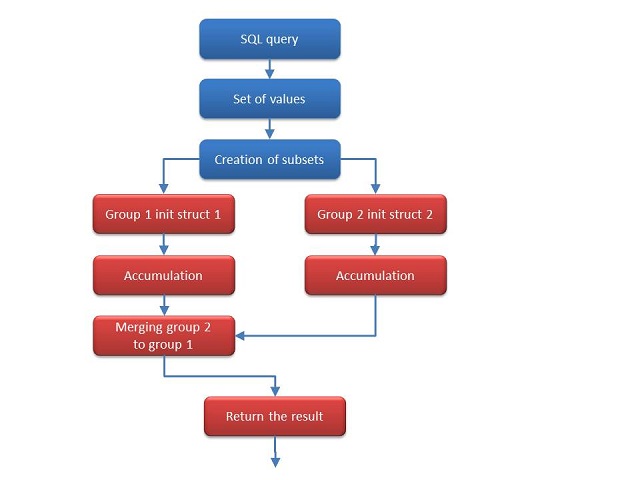
    • Merge():
      • Used because sometimes if the the column to aggregate contains a large number of data the SQL CLR may split those rows into groups and aggregate each group individually and then merge the results of those groups again using the Merge() method
    • Terminate():
      • Used to free any used resources and to return the result
      • Called at the end of the evaluation procedure
    • The sequence of invocation should be like this

3. Register the assembly into SQL
This can be done as follows:
  1. After creating your class library, build your DLL
  2. Run an SQL query to register this DLL into SQL for SQL to be able to recognize and use your struct
  3. This SQL query will be provided in the examples section

4. Register the aggregate functions into SQL
This can be done by running an SQL query which will register our new aggregate function into SQL to be used later. This SQL query will be provided in the examples section.

Now, it is time to see some examples


Example 1
We want to define a new aggregate function to calculate the count of NULLs in a column.

CountNulls.cs
using System;
using System.Data;
using System.Data.SqlClient;
using System.Data.SqlTypes;
using Microsoft.SqlServer.Server;
using System.Collections.ObjectModel;
using System.Linq;
using System.Xml.Serialization;
using System.IO;
using System.Text;
using System.Collections;

namespace DevelopmentSimplyPut.SQLAggregateFunctions
{
    [System.Serializable]
    [Microsoft.SqlServer.Server.SqlUserDefinedAggregate(
       Microsoft.SqlServer.Server.Format.UserDefined,
       IsInvariantToDuplicates = false, // receiving the same value again changes the result
       IsInvariantToNulls = false,      // receiving a NULL value changes the result
       IsInvariantToOrder = true,       // the order of the values doesn't affect the result
       IsNullIfEmpty = true,            // if no values are given the result is null
       MaxByteSize = -1,
       Name = "CountNulls"              // name of the aggregate
    )]
    public struct CountNulls
 {
  private int counter;
  public void Init()
  {
   counter = 0;
  }
  public void Accumulate(object Value)
  {
   if (Value == DBNull.Value)  // count just the rows that are not equal to NULL
    counter++;
  }
  public void Merge(CountNulls Group)
  {
   this.counter += Group.Counter; // when merge is needed the counter of other groups should be added
  }

  public SqlString Terminate()
  {
   return new SqlString(counter.ToString()); //returning the results
  }
 }
}

RegisterAssemblyAndCreatingAggregate.sql
--Turning on CLR functionality
--By default, CLR is disabled in SQL Server so to turn it on
--we need to run this command against our database
EXEC sp_configure 'clr enabled', 1
GO
RECONFIGURE
GO

-- Creating the SQL assembly and linking it to the C# library DLL we created
CREATE ASSEMBLY SQLAggregateFunctions
AUTHORIZATION dbo
FROM 'C:\SQLAggregateFunctions.dll'
WITH PERMISSION_SET = SAFE
GO

CREATE AGGREGATE dbo.CountNulls (@value nvarchar(MAX)) RETURNS nvarchar(MAX)
EXTERNAL NAME SQLAggregateFunctions.[DevelopmentSimplyPut.SQLAggregateFunctions.CountNulls]
--EXTERNAL NAME SQLAssemblyName.[C#NameSpace".C#ClassName].C#MethodName


/*
DROP AGGREGATE dbo.CountNulls
DROP ASSEMBLY SQLAggregateFunctions
*/

Testing.sql
SELECT dbo.CountNulls(MyColumn)
FROM MyTable


Example 2
We want to define a new aggregate function to get the most common value in a column

MostCommon.cs
using System;
using System.Data;
using System.Data.SqlClient;
using System.Data.SqlTypes;
using Microsoft.SqlServer.Server;
using System.Collections.ObjectModel;
using System.Linq;
using System.Xml.Serialization;
using System.IO;
using System.Text;
using System.Collections;

namespace DevelopmentSimplyPut.SQLAggregateFunctions
{
    [System.Serializable]
    [Microsoft.SqlServer.Server.SqlUserDefinedAggregate(
       Microsoft.SqlServer.Server.Format.UserDefined,
       IsInvariantToDuplicates = false, // receiving the same value again changes the result
       IsInvariantToNulls = false,      // receiving a NULL value changes the result
       IsInvariantToOrder = true,       // the order of the values doesn't affect the result
       IsNullIfEmpty = true,            // if no values are given the result is null
       MaxByteSize = -1,
       Name = "MostCommon"              // name of the aggregate
    )]
    public struct MostCommon : IBinarySerialize
    {
        private Collection<string> pool;
        private string result;
        private int count;

        public void Init()
        {
            pool = new Collection<string>();
            result = string.Empty;
            count = -1;
        }
        public void Accumulate(string value)
        {
            if (null != value)
            {
                pool.Add(value.ToString());
            }
        }
        public void Merge(MostCommon group)
        {
            if (null != group.pool && group.pool.Count > 0)
            {
                foreach (string entry in group.pool)
                {
                    pool.Add(entry);
                }
            }
        }
        public SqlString Terminate()
        {
            string[] distinctValues = pool.Distinct().ToArray();

            foreach (string distinctValue in distinctValues)
            {
                int tempCount = pool.Count(s => s.Equals(distinctValue, StringComparison.OrdinalIgnoreCase));

                if (tempCount > count)
                {
                    count = tempCount;
                    result = distinctValue;
                }
            }

            return new SqlString(result.ToString());
        }

        #region IBinarySerialize Members
        public void Read(System.IO.BinaryReader reader)
        {
            this.result = reader.ReadString();
            this.count = reader.ReadInt32();
            int itemsCount = reader.ReadInt32();
            
            pool = new Collection<string>();

            for (int i = 0; i < itemsCount; i++)
         {
             this.pool.Add(reader.ReadString());
         } 
        }
        public void Write(System.IO.BinaryWriter writer)
        {
            writer.Write(this.result);
            writer.Write(this.count);
            writer.Write(pool.Count);
            
            foreach (string entry in pool)
            {
                writer.Write(entry);
            } 
        }
        #endregion
    }
}

RegisterAssemblyAndCreatingAggregate.sql
--Turning on CLR functionality
--By default, CLR is disabled in SQL Server so to turn it on
--we need to run this command against our database
EXEC sp_configure 'clr enabled', 1
GO
RECONFIGURE
GO

-- Creating the SQL assembly and linking it to the C# library DLL we created
CREATE ASSEMBLY SQLAggregateFunctions
AUTHORIZATION dbo
FROM 'C:\SQLAggregateFunctions.dll'
WITH PERMISSION_SET = SAFE
GO

CREATE AGGREGATE dbo.MostCommon (@value nvarchar(MAX)) RETURNS nvarchar(MAX)
EXTERNAL NAME SQLAggregateFunctions.[DevelopmentSimplyPut.SQLAggregateFunctions.MostCommon]
--EXTERNAL NAME SQLAssemblyName.[C#NameSpace".C#ClassName].C#MethodName


/*
DROP AGGREGATE dbo.MostCommon
DROP ASSEMBLY SQLAggregateFunctions
*/

CreateTestDB.sql
USE [TestDB01]
GO

SET ANSI_NULLS ON
GO

SET QUOTED_IDENTIFIER ON
GO

CREATE TABLE [dbo].[T1](
 [Col1] [nvarchar](100) NOT NULL,
 [Col2] [int] NOT NULL,
 [Col3] [int] NOT NULL,
 CONSTRAINT [PK_T1] PRIMARY KEY CLUSTERED 
(
 [Col1] ASC,
 [Col2] ASC,
 [Col3] ASC
)WITH (PAD_INDEX  = OFF, STATISTICS_NORECOMPUTE  = OFF, IGNORE_DUP_KEY = OFF, ALLOW_ROW_LOCKS  = ON, ALLOW_PAGE_LOCKS  = ON) ON [PRIMARY]
) ON [PRIMARY]

GO


INSERT INTO T1(Col1, Col2, Col3)
VALUES('Ahmed', 1, 1)
, ('Ahmed', 1, 2)
, ('Ahmed', 1, 5)
, ('Ahmed', 1, 6)
, ('Ahmed', 2, 2)
, ('Ahmed', 3, 4)
, ('Ahmed', 4, 2)
, ('Ahmed', 5, 2)
, ('Ahmed', 6, 2)
, ('Tarek', 2, 1)
, ('Tarek', 2, 3)
, ('Tarek', 2, 4)
, ('Tarek', 2, 5)
, ('Tarek', 2, 7)
, ('Tarek', 2, 9)
, ('Tarek', 3, 5)
, ('Tarek', 4, 5)
, ('Tarek', 6, 5)
, ('Hasan', 2, 3)
, ('Hasan', 2, 7)
, ('Hasan', 5, 0)
, ('Hasan', 5, 1)
, ('Hasan', 5, 4)
, ('Hasan', 8, 6)

Test.sql
USE [TestDB01]
GO

SELECT
Col1
, (SELECT dbo.MostCommon(Col2) FROM T1 where main.Col1 = Col1 GROUP BY Col1) AS CommonCol2
, (SELECT dbo.MostCommon(Col3) FROM T1 where main.Col1 = Col1 GROUP BY Col1) AS CommonCol3
FROM T1 AS main
GROUP BY Col1


That's it for now. You can read more about this topic on the internet and know more about what you can and can't do using this technique. You can make use of the resources below.


Resources
  1. Custom Aggregates in SQL Server - CodeProject
  2. How to implement your own aggregate function in SQLCLR, SQL Server 2005 - Bashar Kokash' Blog
  3. System.Data.SqlTypes Namespace ()
  4. IBinarySerialize Interface (Microsoft.SqlServer.Server)


2013-02-27

Items Combinations Generation Library

[Update] This library is now replaced with a new one. The new one is more advanced and enhanced. You can check it on Possibilities Cube Library - A Library Smart Enough To Calculate All Possibilities With Logical Conditions


Sometimes you have a set of items (could be numbers, names, custom entities, .....) and you need to get all possible combinations each consists of a given number of items from the bigger set.

To understand what I am saying, imagine that you need to write a program by which a user can define some birthday gifts. Each gift has an id, name, description, price, ...... Your program is expected to provide all possible combinations of gifts that a father can get to his son given that the number of gift items doesn't exceed 5 and the price doesn't exceed LE 150.

To solve the problem above, which is a mathematical problem in the first place, you can use some of the mathematical algorithms. But, only for the sake of demonstration, I will assume that we will use a brute force approach to solve the problem.

So, to do the job, at some point in your code, you will need to generate all the possibilities and combinations of gift items that the father can buy for his son. Sure not all these combinations are valid and you will need to filter them according to your business but at least it is a starting point.

So, to get all possible combinations, you can use the same logic used in the binary tables. For example, in binary, any bit can be 0 or 1 and nothing else. So, if we need to have all possible sets consisting of 2 bits, we will get
0 , 0
0 , 1
1 , 0
1 , 1

These are all possible combinations you can get in this case. But, in case of sets consisting of 3 bits instead of 2, we will get
0 , 0 , 0
0 , 0 , 1
0 , 1 , 0
0 , 1 , 1
1 , 0 , 0
1 , 0 , 1
1 , 1 , 0
1 , 1 , 1

and so on........

So, this leads us to the "Items Combinations Generation Library" that I am presenting. This library provides a class with some methods which you can use to get all possible combinations of any set of items. It returns an array of indexes of items you have. So, when you get [(0 , 0), (0 , 1), (1 , 0), (1 , 1)] these numbers refer to the indexes of the items in your collection of items.

Ok, this is the time for the code.


The Library Code

Possibilities.cs
using System;
using System.Collections.Generic;
using System.Linq;
using System.Text;

namespace DevelopmentSimplyPut.CommonUtilities
{
    public class Possibilities
    {
        #region Properties
        int numberOfItems;
        public int NumberOfItems
        {
            get { return numberOfItems; }
            set 
            {
                if (value > 0)
                {
                    numberOfItems = value;
                }
                else
                {
                    throw new Exception("NumberOfItems must be +ve and greater than 0.");
                }
            }
        }
        int numberOfInstancesPerPossibility;
        public int NumberOfInstancesPerPossibility
        {
            get { return numberOfInstancesPerPossibility; }
            set
            {
                if (value > 0)
                {
                    numberOfInstancesPerPossibility = value;
                }
                else
                {
                    throw new Exception("NumberOfInstancesPerPossibility must be +ve and greater than 0.");
                }
            }
        }
        int maxRowIndex;
        int maxColumnIndex;
        #endregion Properties

        #region Constructors
        public Possibilities(int _numberOfItems, int _numberOfInstancesPerPossibility)
        {
            NumberOfItems = _numberOfItems;
            NumberOfInstancesPerPossibility = _numberOfInstancesPerPossibility;
            maxRowIndex = intPow(NumberOfItems, NumberOfInstancesPerPossibility) - 1;
            maxColumnIndex = NumberOfInstancesPerPossibility - 1;
        }
        #endregion Constructors

        #region Methods
        public int[,] GetPossibilities()
        {
            int[,] result = new int[maxRowIndex + 1, maxColumnIndex + 1];

            for (int i = 0; i <= maxRowIndex; i++)
            {
                int[] rowResults = GetPossiblityByIndex(i);
                for (int k = 0; k < rowResults.Length; k++)
                {
                    result[i, k] = rowResults[k];
                }
            }
            
            return result;
        }
        public int[] GetPossiblityByIndex(int rowIndex)
        {
            int[] result = null;

            if (rowIndex >= 0)
            {
                if (rowIndex <= maxRowIndex)
                {
                    result = new int[maxColumnIndex + 1];

                    for (int i = 0; i <= maxColumnIndex; i++)
                    {
                        result[i] = GetPossiblityByIndex(rowIndex, i);
                    }
                }
                else
                {
                    throw new Exception(string.Format("rowIndex can not be greater than {0}", maxRowIndex));
                }
            }
            else
            {
                throw new Exception("rowIndex must be +ve or equal to 0.");
            }

            return result;
        }
        public int GetPossiblityByIndex(int rowIndex, int columnIndex)
        {
            int result = 0;

            if (rowIndex >= 0 && columnIndex >= 0)
            {
                if (rowIndex > maxRowIndex)
                {
                    throw new Exception(string.Format("rowIndex can not be greater than {0}", maxRowIndex));
                }
                else if (columnIndex > maxColumnIndex)
                {
                    throw new Exception(string.Format("columnIndex can not be greater than {0}", maxColumnIndex));
                }
                else
                {
                    int numberOfHops = intPow(NumberOfItems, columnIndex);
                    result = GetPossiblityByIndex(NumberOfItems, numberOfHops, rowIndex);
                }
            }
            else
            {
                throw new Exception("rowIndex and columnIndex must be +ve or equal to 0.");
            }

            return result;
        }
        private int GetPossiblityByIndex(int numberOfItems, int numberOfHops, int rowIndex)
        {
            int result = 0;
            int maxItemIndex = numberOfItems - 1;
            result = rowIndex / numberOfHops;
            result = result % numberOfItems;
            return result;
        }
        private int intPow(int a, int b)
        {
            int result = 0;

            if (0 == b)
            {
                result = 1;
            }
            else if (1 == b)
            {
                result = a;
            }
            else
            {
                result = a;
                for (int i = 0; i < b - 1; i++)
                {
                    result *= a;
                }
            }
            
            return result;
        }
        #endregion Methods
    }
}


Testing Windows Forms Application

MainForm.Designer.cs
namespace TestApp
{
    partial class MainForm
    {
        /// <summary>
        /// Required designer variable.
        /// </summary>
        private System.ComponentModel.IContainer components = null;

        /// <summary>
        /// Clean up any resources being used.
        /// </summary>
        /// <param name="disposing">true if managed resources should be disposed; otherwise, false.</param>
        protected override void Dispose(bool disposing)
        {
            if (disposing && (components != null))
            {
                components.Dispose();
            }
            base.Dispose(disposing);
        }

        #region Windows Form Designer generated code

        /// <summary>
        /// Required method for Designer support - do not modify
        /// the contents of this method with the code editor.
        /// </summary>
        private void InitializeComponent()
        {
            this.btnRun = new System.Windows.Forms.Button();
            this.label1 = new System.Windows.Forms.Label();
            this.label2 = new System.Windows.Forms.Label();
            this.txtNumOfItems = new System.Windows.Forms.TextBox();
            this.txtNumOfInstances = new System.Windows.Forms.TextBox();
            this.rtxtOutput = new System.Windows.Forms.RichTextBox();
            this.SuspendLayout();
            // 
            // btnRun
            // 
            this.btnRun.Location = new System.Drawing.Point(264, 6);
            this.btnRun.Name = "btnRun";
            this.btnRun.Size = new System.Drawing.Size(47, 54);
            this.btnRun.TabIndex = 0;
            this.btnRun.Text = "Run";
            this.btnRun.UseVisualStyleBackColor = true;
            this.btnRun.Click += new System.EventHandler(this.btnRun_Click);
            // 
            // label1
            // 
            this.label1.AutoSize = true;
            this.label1.Location = new System.Drawing.Point(4, 12);
            this.label1.Name = "label1";
            this.label1.Size = new System.Drawing.Size(85, 13);
            this.label1.TabIndex = 1;
            this.label1.Text = "Number of items";
            // 
            // label2
            // 
            this.label2.AutoSize = true;
            this.label2.Location = new System.Drawing.Point(4, 40);
            this.label2.Name = "label2";
            this.label2.Size = new System.Drawing.Size(105, 13);
            this.label2.TabIndex = 2;
            this.label2.Text = "Number of instances";
            // 
            // txtNumOfItems
            // 
            this.txtNumOfItems.Location = new System.Drawing.Point(116, 9);
            this.txtNumOfItems.Name = "txtNumOfItems";
            this.txtNumOfItems.Size = new System.Drawing.Size(137, 20);
            this.txtNumOfItems.TabIndex = 3;
            // 
            // txtNumOfInstances
            // 
            this.txtNumOfInstances.Location = new System.Drawing.Point(115, 40);
            this.txtNumOfInstances.Name = "txtNumOfInstances";
            this.txtNumOfInstances.Size = new System.Drawing.Size(137, 20);
            this.txtNumOfInstances.TabIndex = 4;
            // 
            // rtxtOutput
            // 
            this.rtxtOutput.Location = new System.Drawing.Point(8, 66);
            this.rtxtOutput.Name = "rtxtOutput";
            this.rtxtOutput.Size = new System.Drawing.Size(299, 217);
            this.rtxtOutput.TabIndex = 5;
            this.rtxtOutput.Text = "";
            // 
            // MainForm
            // 
            this.AutoScaleDimensions = new System.Drawing.SizeF(6F, 13F);
            this.AutoScaleMode = System.Windows.Forms.AutoScaleMode.Font;
            this.ClientSize = new System.Drawing.Size(315, 291);
            this.Controls.Add(this.rtxtOutput);
            this.Controls.Add(this.txtNumOfInstances);
            this.Controls.Add(this.txtNumOfItems);
            this.Controls.Add(this.label2);
            this.Controls.Add(this.label1);
            this.Controls.Add(this.btnRun);
            this.Name = "MainForm";
            this.Text = "Test Application";
            this.ResumeLayout(false);
            this.PerformLayout();

        }

        #endregion

        private System.Windows.Forms.Button btnRun;
        private System.Windows.Forms.Label label1;
        private System.Windows.Forms.Label label2;
        private System.Windows.Forms.TextBox txtNumOfItems;
        private System.Windows.Forms.TextBox txtNumOfInstances;
        private System.Windows.Forms.RichTextBox rtxtOutput;
    }
}

MainForm.cs
using System;
using System.Collections.Generic;
using System.ComponentModel;
using System.Data;
using System.Drawing;
using System.Linq;
using System.Text;
using System.Windows.Forms;
using System.IO;
using DevelopmentSimplyPut.CommonUtilities;

namespace TestApp
{
    public partial class MainForm : Form
    {
        public MainForm()
        {
            InitializeComponent();
        }

        private void btnRun_Click(object sender, EventArgs e)
        {
            rtxtOutput.Text = string.Empty;

            Possibilities container = new Possibilities(int.Parse(txtNumOfItems.Text), int.Parse(txtNumOfInstances.Text));
            int[,] allPossibilities = container.GetPossibilities();

            for (int i = 0; i < allPossibilities.GetLength(0); i++)
            {
                for (int k = 0; k < allPossibilities.GetLength(1); k++)
                {
                    rtxtOutput.Text += allPossibilities[i, k].ToString() + " , ";
                }

                rtxtOutput.Text += Environment.NewLine;
            }

            MessageBox.Show("Done");
        }
    }
}

Running this program you will get the results in the screenshots below

Items Combinations Generation Library

Items Combinations Generation Library

Items Combinations Generation Library


Finally, you can download the source code from here


2013-02-22

Extensible Logging Library For Sharepoint With ULS Logging Support

What I am presenting here is a library used for logging in Sharepoint 2010.

What makes this library a good choice?
  1. Its code is clean and maintainable
  2. Its code is extensible as you can easily add support to many third party logging services with just some few code lines
  3. It provides a single entry point static class for usage instead of many classes

Which logging services does this library currently support?
Currently the library supports the OOTB Unified Logging Service (ULS) but for sure you can add the support for other logging services like log4net and others with just some few lines of code.


Is the code simple or complicated?
  1. The first code part: The main library code is simple and follow the "Bridge" and "Factory" design patterns. I had already wrote a post on these two design patterns with an example of how to use them. If you didn't read this post and it is your first time to hear about these two design patterns, I really encourage you to read One Of The Methodologies To Write Clean, Maintainable & Extensible Software
  2. The second code part: The main entry point static class which enables you to use the library in an easy way. This class is so simple and clear
  3. The third code part: The implementations of the logging services you wish the library can support. The complexity of this part depends on the logging service itself. Some may be simple and others may be complex

Can we see the code?

LoggerDefinitions.cs
using System;
using System.Collections.Generic;
using System.Linq;
using System.Text;

namespace DevelopmentSimplyPut.CommonUtilities.Logging
{
    public enum LoggingLevel
    {
        Debug = 0,
        Info = 1,
        Warn = 2,
        Error = 3,
        Fatal = 4
    }

    public interface ILogger
    {
        void Configure(Dictionary<string,object> settings);
        void Log(string message, LoggingLevel level);
        void Log(Exception exception, LoggingLevel level);
        void Log(Exception exception, string message, LoggingLevel level);
    }

    public abstract class Logger : ILogger
    {
        public abstract void Configure(Dictionary<string, object> settings);
        public abstract void Log(string message, LoggingLevel level);
        public abstract void Log(Exception exception, LoggingLevel level);
        public abstract void Log(Exception exception, string message, LoggingLevel level);
    }
}

LoggerFactory.cs:
using System;
using System.Collections.Generic;
using System.Linq;
using System.Text;
using DevelopmentSimplyPut.CommonUtilities.Logging.ULS;

namespace DevelopmentSimplyPut.CommonUtilities.Logging
{
    public static class LoggerFactory
    {
        public static ILogger GetLoggerInstance(SystemLoggerType loggerType, Dictionary<string, object> settings)
        {
            ILogger result = null;

            switch (loggerType)
            {
                case SystemLoggerType.ULS:
                    result = ULSLogger.Current;
                    break;
                default:
                    result = ULSLogger.Current;
                    break;
            }

            result.Configure(settings);
            return result;
        }
    }
}

SystemLogger.cs:
using System;
using System.Collections.Generic;
using System.Linq;
using System.Text;
using DevelopmentSimplyPut.CommonUtilities.Helpers;

namespace DevelopmentSimplyPut.CommonUtilities.Logging
{
    public enum SystemLoggerType
    {
        ULS = 0
        //, Log4Net = 1
    }

    public static class SystemLogger
    {
        private static ILogger logger;
        private static void SetLogger(SystemLoggerType loggerType)
        {
            switch (loggerType)
            {
                case SystemLoggerType.ULS:
                    Dictionary<string, object> settings = new Dictionary<string, object>(StringComparer.OrdinalIgnoreCase);
                    settings.Add("ProductDiagName", "DevelopmentSimplyPut");
                    logger = LoggerFactory.GetLoggerInstance(SystemLoggerType.ULS, settings);
                    break;
            }
        }

        /// <summary>
        /// Gets current initialized system logger. If not already initialized, initializes a new default logger and returns it.
        /// </summary>
        public static ILogger Logger
        {
            get
            {
                if (logger == null)
                {
                    SetLogger(SystemLoggerType.ULS);
                }
                return logger;
            }
        }
        /// <summary>
        /// Resets current system logger to the default logger and finally returns this logger instance.
        /// </summary>
        /// <returns></returns>
        public static ILogger ResetLogger()
        {
            return ResetLogger(SystemLoggerType.ULS);
        }
        /// <summary>
        /// Resets current system logger to a specific logger type and finally returns this logger instance.
        /// </summary>
        /// <param name="loggerType"></param>
        /// <returns></returns>
        public static ILogger ResetLogger(SystemLoggerType loggerType)
        {
            SetLogger(loggerType);
            return logger;
        }
    }
}

ULSLogger.cs:
using System;
using System.Collections.Generic;
using System.Linq;
using System.Text;
using Microsoft.SharePoint.Administration;
using System.Globalization;

namespace DevelopmentSimplyPut.CommonUtilities.Logging.ULS
{
    public class ULSLogger : Logger
    {
        private string productDiagName = string.Empty;
        private ULSLogger()
        {
        }
        
        private static ULSLoggingService CurrentServices
        {
            get;
            set;
        }

        private static ULSLogger current;
        public static ULSLogger Current
        {
            get
            {
                if (current == null)
                {
                    current = new ULSLogger();
                }
                return current;
            }
        }
        
        public override void Configure(Dictionary<string, object> settings)
        {
            if (settings != null && settings.Count > 0 && settings.Any(record => record.Key.ToUpperInvariant() == "ProductDiagName".ToUpperInvariant()))
            {
                productDiagName = Convert.ToString(settings["ProductDiagName"]);
                CurrentServices = new ULSLoggingService(productDiagName);
            }
        }

        public override void Log(string message, LoggingLevel level)
        {
            Log(null, message, level);
        }
        public override void Log(Exception exception, LoggingLevel level)
        {
            Log(exception, exception.Message + Environment.NewLine + Environment.NewLine + exception.StackTrace, level);
        }
        public override void Log(Exception exception, string message, LoggingLevel level)
        {
            string msg =
                (null == exception) ? (message) :
                string.Format(CultureInfo.InvariantCulture, "{0}\n\n{1}\n\n{2}", message, exception.Message, exception.StackTrace);

            CurrentServices.Log(msg, level);
        }
    }
}

ULSLoggingService.cs:
using System;
using System.Collections.Generic;
using System.Linq;
using System.Text;
using Microsoft.SharePoint.Administration;

namespace DevelopmentSimplyPut.CommonUtilities.Logging.ULS
{
    public class ULSLoggingService : SPDiagnosticsServiceBase
    {
        public ULSLoggingService(string productName) : base(productName, SPFarm.Local)
        {
        }
        
        protected override IEnumerable<SPDiagnosticsArea> ProvideAreas()
        {
            List<SPDiagnosticsArea> areas = new List<SPDiagnosticsArea>
            {
                new SPDiagnosticsArea
                (Name, new List<SPDiagnosticsCategory>
                    {
                        new SPDiagnosticsCategory("Debug", TraceSeverity.None, EventSeverity.None),
                        new SPDiagnosticsCategory("Error", TraceSeverity.Unexpected, EventSeverity.Error),
                        new SPDiagnosticsCategory("Info", TraceSeverity.Monitorable, EventSeverity.Information),
                        new SPDiagnosticsCategory("Warn", TraceSeverity.Medium, EventSeverity.Warning),
                        new SPDiagnosticsCategory("Fatal", TraceSeverity.High, EventSeverity.ErrorCritical),
                    }
                )
            };

            return areas;
        }

        private void LogDebug(string message)
        {
            SPDiagnosticsCategory category = Areas[Name].Categories["Debug"];
            WriteTrace(0, category, category.TraceSeverity, message);
        }
        private void LogError(string message)
        {
            SPDiagnosticsCategory category = Areas[Name].Categories["Error"];
            WriteTrace(0, category, category.TraceSeverity, message);
        }
        private void LogInfo(string message)
        {
            SPDiagnosticsCategory category = Areas[Name].Categories["Info"];
            WriteTrace(0, category, category.TraceSeverity, message);
        }
        private void LogWarn(string message)
        {
            SPDiagnosticsCategory category = Areas[Name].Categories["Warn"];
            WriteTrace(0, category, category.TraceSeverity, message);
        }
        private void LogFatal(string message)
        {
            SPDiagnosticsCategory category = Areas[Name].Categories["Fatal"];
            WriteTrace(0, category, category.TraceSeverity, message);
        }
        public void Log(string message, LoggingLevel level)
        {
            switch (level)
            {
                case LoggingLevel.Debug:
                    LogDebug(message);
                    break;
                case LoggingLevel.Error:
                    LogError(message);
                    break;
                case LoggingLevel.Fatal:
                    LogFatal(message);
                    break;
                case LoggingLevel.Info:
                    LogInfo(message);
                    break;
                case LoggingLevel.Warn:
                    LogWarn(message);
                    break;
                default:
                    LogDebug(message);
                    break;
            }
        }
    }
}


How to use this library?
catch (NullReferenceException ex)
{
 SystemLogger.Logger.Log(ex, LoggingLevel.Error);
}

or

catch (NullReferenceException ex)
{
 SystemLogger.Logger.Log(ex, "This is custom error message for logging", LoggingLevel.Error);
}

or

catch (NullReferenceException ex)
{
 SystemLogger.Logger.Log("This is custom error message for logging", LoggingLevel.Warn);
}

or

SystemLogger.Logger.Log("This is just a hint message for logging", LoggingLevel.Info);

This is just a sample of what you can do using this library. You can browse through the code and you will get the whole thing. For sure you can customize the code to add any other functionality you wish to have or modify an existing one.

This code is already used in commercial solutions and it proved to be working efficiently among the regular needs but you can apply your changes as I said before.


That's it, hope you find this library useful and I will be waiting for your feedback.
Bye.


2013-02-01

How To Call WCF Web Service With Authentication Credentials

When you deal with WCF web services, sometimes you need to call a web service with certain authentication credentials -username (with/without domain) and password- to be able to take some high privilege actions.

Me myself faced such case and tried to find the proper way to do it. So, I found that the reference I created to the web service has a property called "Credentials" through which I can provide my credentials.

But, when I tried my code, I found that my request is still not authenticated. After further investigations, I decided to search msdn for all properties related to the authentication topic to see if I am missing something.

So, I found that my reference class to my web service inherits from "System.Web.Services.Protocols.SoapHttpClientProtocol" class. So, by the aid of google, I found some interesting results. It is not enough to set the "Credentials" property of my reference. I have three more properties to set to achieve what I want, so lets see some code.

//Creating a reference to your WCF web service
MyCustomService service = new MyCustomService();

/*
AllowAutoRedirect is "true" to automatically redirect the client to follow server redirects; otherwise, "false". The default is "false".

If you send authentication information, such as a user name and password,
you do not want to enable the server to redirect, because this can compromise security
*/
service.AllowAutoRedirect = false;

/*
PreAuthenticate is "true" to pre-authenticate the request; otherwise, "false". The default is "false".

When PreAuthenticate is false, a request is made to the Web service method
without initially attempting to authenticate the user. If the Web service allows anonymous
access, then the Web service method is executed, else, a 401 HTTP return code is sent back.
*/
service.PreAuthenticate = true;

/*
UseDefaultCredentials is "true" if the Credentials property is set to the value of the CredentialCache.DefaultCredentials property; otherwise, "false".
*/
service.UseDefaultCredentials = false;

//Providing credentials
service.Credentials = new NetworkCredential("userName", "password", "domain");

That's it, after setting the four properties "AllowAutoRedirect", "PreAuthenticate", "UseDefaultCredentials" and "Credentials" properly I could get my call to my web service authenticated.


References
System.Web.Services.Protocols.SoapHttpClientProtocol
HttpWebClientProtocol.AllowAutoRedirect
WebClientProtocol.PreAuthenticate
WebClientProtocol.UseDefaultCredentials
WebClientProtocol.Credentials

2013-01-13

How To Adjust Sharepoint OOTB Webparts Relative Paths

While working on some content query webparts (CQWP), I had the need to apply my own XSLT for styling. So, after building my custom XSLT, I thought I have finished the hard part and that everything is almost ready. Unfortunately this wasn't true.

In my ".webpart" file I needed to set the path for my custom XSLT and it popped into my head that I can use the "~sitecollection" token to be replaced by the real site collection URL. So, I did it and started testing my webpart. Unfortunately, it didn't work :(

The webpart showed me an error and after tracing the error I figured out that the webpart couldn't recognize the XSLT file path because the "~sitecollection" token wasn't resolved to the real site collection URL.

After searching, I found out that this is a known issue as the "~sitecollection" token is only resolved when it is found in some webpart properties but not all of them. The XSLT path property is one of those which are not resolved.

So, to fix this issue, I kept the "~sitecollection" token in the XSLT and wrote some code in the feature activation to replace this token with the real site collection URL. This way, the XSLT path will be recognized by the webpart and the webpart will work.

Now, it is time to see some code.


The ".webpart" file (just a sample of the file)
<webParts>
 <webPart xmlns="http://schemas.microsoft.com/WebPart/v3">
  <metaData>
   <type name="Microsoft.SharePoint.Publishing.WebControls.ContentByQueryWebPart, Microsoft.SharePoint.Publishing, Version=14.0.0.0, Culture=neutral, PublicKeyToken=71e9bce111e9429c" />
   <importErrorMessage>Cannot import this Web Part.</importErrorMessage>
  </metaData>
  <data>
   <properties>
    <property name="Title" type="string">OOTB WebPart</property>
    <property name="ItemXslLink" type="string">~sitecollection/Style Library/XSL Style Sheets/OOTB_WebPart_ItemStyle.xsl</property>
    <property name="MainXslLink" type="string">~sitecollection/Style Library/XSL Style Sheets/ContentQueryMain_OOTB_WebPart.xsl</property>
   </properties>
  </data>
 </webPart>
</webParts>

The "Elements.xml" file
<?xml version="1.0" encoding="utf-8"?>
<Elements xmlns="http://schemas.microsoft.com/sharepoint/">
  <Module Name="NewsWebParts" Url="_catalogs/wp" RootWebOnly="TRUE">
    <File Path="OOTB_WebPart.webpart" Url="OOTB_WebPart.webpart" Type="GhostableInLibrary" IgnoreIfAlreadyExists="TRUE">
      <Property Name="Group" Value="MyWebParts" />
      <Property Name="Title" Value="OOTB WebPart" />
    </File>
  </Module>
</Elements>

The feature activation code
using System;
using System.Runtime.InteropServices;
using System.Security.Permissions;
using Microsoft.SharePoint;
using Microsoft.SharePoint.Security;

namespace DevelopmentSimplyPut.Features.WebParts
{
    [Guid("74b0dfd2-b906-4124-801d-adbd750579c6")]
    public class WebPartsEventReceiver : SPFeatureReceiver
    {
        public override void FeatureActivated(SPFeatureReceiverProperties properties)
        {
            AdjustSiteRelativePaths(properties, "OOTB_WebPart.webpart");
        }
  
  public static void AdjustSiteRelativePaths(SPFeatureReceiverProperties featureProp, string webPartName)
  {
   SPSite site = null;

   if (featureProp.Feature.Parent is SPSite)
   {
    site = featureProp.Feature.Parent as SPSite;
   }
   else
   {
    site = ((SPWeb)featureProp.Feature.Parent).Site;
   }

   if (site != null)
   {
    SPList webPartsGallery = site.GetCatalog(SPListTemplateType.WebPartCatalog);
    SPListItemCollection allWebParts = webPartsGallery.Items;

    if (!webPartName.EndsWith(".webpart", StringComparison.OrdinalIgnoreCase))
    {
     webPartName += ".webpart";
    }

    SPListItem webPart =
    (
     from SPListItem wp
     in allWebParts
     where wp.File.Name == webPartName
     select wp
    ).SingleOrDefault();

    if (webPart != null)
    {
     string siteCollectionUrl = site.ServerRelativeUrl;
     if (!siteCollectionUrl.EndsWith("/", StringComparison.OrdinalIgnoreCase))
     {
      siteCollectionUrl += "/";
     }

     string fileContents = Encoding.UTF8.GetString(webPart.File.OpenBinary());
     fileContents = fileContents.Replace(@"~sitecollection/", siteCollectionUrl);
     webPart.File.SaveBinary(Encoding.UTF8.GetBytes(fileContents));
    }
   }
  }
    }
}


So, now, whenever the feature provisioning the webpart is activated, the webpart in the webparts gallery will be updated with the new ".webpart" file, then the "~sitecollection" token will be replaced with the real site collection  URL.

That's it, mission accomplished.


2012-12-31

How To Change Sharepoint PageLayout Icon To Custom Image

In Sharepoint, when you create a new article page, you have to choose a page layout for this article to control the way the article page will appear. So, to differentiate between different page layouts from UI, each page layout has its own title and an image. Thus, once you click on any page layout, its corresponding image appears.

This image should somehow reflect the basic structure of the layout so that you can differentiate between all of the layouts based on what you see in the image. So, if the page layout consists of three columns, the image should reflect this. Also, if the page layout consists of two columns, the image should reflect this and so on.

There are two places in system UI where you can see the page layout image.

When creating a new article page and selecting its page layout

When changing the page layout of an existing article page

So, when you work on your custom page layouts, the OOTB page layout images may not be suitable for your layouts. So, you may need to assign your custom descriptive images to these page layouts to maintain the same concept.

When I first decided to do this while working on my project, I thought that I will just need to set the "PublishingPreviewImage" property of my page layouts in the "Elements.xml" file. But, when I tried to do it, I found that the images of my custom layouts are still the default ones.

After some searching, I found out that some of the page layouts properties are not updated once they are set and deployed by upgrading the solution. The only way to update these images is to retract then deploy your solution or to do it using some code executed at the feature activation.

Sure I decided to take the second approach. So, now I need to write some code to be executed when the feature -provisioning my custom page layouts- is activated to set the image of my page layouts explicitly by code.

The "Elements.xml" file looks as follows;
<?xml version="1.0" encoding="utf-8"?>
<Elements xmlns="http://schemas.microsoft.com/sharepoint/">
 <Module Name="pagelayouts" Url="_catalogs/masterpage">
  <File Path="pagelayouts\layout1.aspx" Url="MyLayouts/layout1.aspx" Type="GhostableInLibrary" IgnoreIfAlreadyExists="TRUE" >
    <Property Name="Title" Value="Layout 1" />
    <Property Name="ContentType" Value="$Resources:cmscore,contenttype_pagelayout_name;" />
    <Property Name="PublishingPreviewImage" Value="~SiteCollection/_layouts/IMAGES/MyLayouts/layout1.png" />
    <Property Name="PublishingAssociatedContentType" Value=";#First Content Type;#0x010100C568DB52D9D0A14D9B2FDCC96666E9F2007948130EC3DB064584E219954237AF3900242457EFB8B24247815D688C526CD44D003ac3c10715a04460946daa43bdfc1294002defb7a9b25f4735aa77637a948b471d;#"/>
  </File>
  <File Path="pagelayouts\layout2" Url="MyLayouts/layout2.aspx" Type="GhostableInLibrary" IgnoreIfAlreadyExists="TRUE" >
    <Property Name="Title" Value="Layout 2" />
    <Property Name="ContentType" Value="$Resources:cmscore,contenttype_pagelayout_name;" />
    <Property Name="PublishingPreviewImage" Value="~SiteCollection/_layouts/IMAGES/MyLayouts/layout2.png" />
    <Property Name="PublishingAssociatedContentType" Value=";#First Content Type;#0x010100C568DB52D9D0A14D9B2FDCC96666E9F2007948130EC3DB064584E219954237AF3900242457EFB8B24247815D688C526CD44D003ac3c10715a04460946daa43bdfc1294002defb7a9b25f4735aa77637a948b471d;#"/>
  </File>
 </Module>
</Elements>

So, now in the feature activation, I can set the "PublishingPreviewImage" property of each of these two page layouts to the path of my custom images. This is easy, but, I thought I can achieve the same result without depending on some hard-coded values in my code, instead, I can depend on the values already set in the "Elements.xml" file.

So, to do this, I used the approach I already explained before in a previous post. It is the post called "How Get Real-time Info Of Sharepoint Module Files On Feature Activation Event Listener". If you didn't read this post, please try to read it before you move to the next step.

So, now the code will be as follows;
using System;
using System.Runtime.InteropServices;
using System.Security.Permissions;
using Microsoft.SharePoint;
using Microsoft.SharePoint.Security;
using DevelopmentSimplyPut.CommonUtilities.Helpers;

namespace DevelopmentSimplyPut.News.Features.pagelayouts
{
    [Guid("e882ad84-444a-421a-961c-bb945556c3f8")]
    public class pagelayoutsEventReceiver : SPFeatureReceiver
    {
        public override void FeatureActivated(SPFeatureReceiverProperties properties)
        {
            PageLayoutsHelper.UpdatePageLayoutsPublishingPreviewImage(properties);
        }
    }
}

using System;
using System;
using System.Collections.Generic;
using System.Linq;
using System.Text;
using Microsoft.SharePoint;
using System.Web;
using Microsoft.SharePoint.WebPartPages;
using System.Web.UI.WebControls.WebParts;
using System.Globalization;
using System.Xml;
using Microsoft.SharePoint.Publishing;
using System.Collections.ObjectModel;

namespace DevelopmentSimplyPut.CommonUtilities.Helpers
{
    public static class PageLayoutsHelper
    {
  public static void UpdatePageLayoutsPublishingPreviewImage(SPFeatureReceiverProperties properties)
  {
   SPSite site = null;

   if (properties.Feature.Parent is SPSite)
   {
    site = properties.Feature.Parent as SPSite;
   }
   else
   {
    site = (properties.Feature.Parent as SPWeb).Site;
   }

   if(null != site)
   {
    PublishingSite publishingSite = new PublishingSite(site);
    PageLayoutCollection layouts = publishingSite.PageLayouts;
    List<ModuleInfo> moduleInfoCollection = FeaturesHelper.GetModuleFilesInfo(properties);
    foreach (PageLayout layout in layouts)
    {
     string layoutIdentifier = layout.ServerRelativeUrl;
     ModuleInfo moduleInfo = moduleInfoCollection.DefaultIfEmpty(null).FirstOrDefault(module => module.Url == "_catalogs/masterpage");
     if (null != moduleInfo)
     {
      ModuleFile fileInfo = moduleInfo.Files.DefaultIfEmpty(null).FirstOrDefault(file => layoutIdentifier.Contains(file.Url));
      if (null != fileInfo)
      {
       string imagePath = string.Empty;

       if (fileInfo.Properties["PublishingPreviewImage"].Contains(","))
       {
        imagePath = fileInfo.Properties["PublishingPreviewImage"].Split(',')[0].Trim().ToUpperInvariant();  
       }
       else
       {
        imagePath = fileInfo.Properties["PublishingPreviewImage"].Trim().ToUpperInvariant();
       }

       if (imagePath.Contains("~SITECOLLECTION"))
       {
        string siteCollectionPath = site.ServerRelativeUrl.ToUpperInvariant();
        if (!siteCollectionPath.EndsWith("/"))
        {
         siteCollectionPath += "/";
        }
        imagePath = imagePath.Replace("~SITECOLLECTION/", siteCollectionPath).Replace("~SITECOLLECTION", siteCollectionPath);
       }

       if (!string.IsNullOrEmpty(imagePath))
       {
        SPFile layoutFile = layout.ListItem.File;
        SPFileHelper.PrepareFileForChanges(layoutFile);
        layout.PreviewImageUrl = imagePath;
        layout.Update();
        SPFileHelper.FinalizeFile(layoutFile);
       }
      }
     }
    }
   }
  }
 }
}

using System;
using System.Collections.Generic;
using System.Linq;
using System.Text;
using Microsoft.SharePoint;

namespace DevelopmentSimplyPut.CommonUtilities.Helpers
{
    public static class SPFileHelper
    {
        public static void PrepareFileForChanges(SPFile file)
        {
            if (null != file)
            {
                bool checkOutEnabled =
                    file.Item == null
                        ? file.ParentFolder.Item.ParentList.ForceCheckout
                        : file.Item.ParentList.ForceCheckout;

                if (checkOutEnabled)
                {
                    if (file.CheckOutType != SPFile.SPCheckOutType.None)
                    {
                        file.UndoCheckOut();
                    }
                    file.CheckOut();
                }
            }
        }
        public static void FinalizeFile(SPFile file)
        {
            if (null != file)
            {
                bool checkOutEnabled =
                        file.Item == null
                            ? file.ParentFolder.Item.ParentList.ForceCheckout
                            : file.Item.ParentList.ForceCheckout;

                bool needsApproval =
                    file.Item == null
                        ? file.ParentFolder.Item.ParentList.EnableModeration
                        : file.Item.ParentList.EnableModeration;

                if (checkOutEnabled)
                {
                    file.CheckIn(string.Empty, SPCheckinType.MajorCheckIn);
                }

                if (needsApproval)
                {
                    file.Approve(string.Empty);
                }

                file.Update();
            }
        }
    }
}

So, now every time the feature is activated, the page layouts images will be updated with the ones set in the "Elements.xml".


That's it. Hope this will help you someday.
Good Luck.


2012-12-28

How To Get Real-time Info Of Sharepoint Module Files On Feature Activation Event Listener

Sometimes you need to run some code at the moment of certain feature activation. This is for sure doable by creating an event receiver on the desired feature and then overriding the code of the "FeatureActivated" method. This topic is not the main topic here so I will assume that you already know how to do this.

Ok, but what I will be talking about in this post is how to use the module "Elements.xml" file to get live or real-time data to be used inside your "FeatureActivated" code. Let me explain first what I really mean here.

Sometimes in your "FeatureActivated" code, you need to use some info you already provided in the module "Elements.xml" file. This info could be some files names, some properties or some URLs. For sure the code you write in the "FeatureActivated" code is somehow case specific and you may have no problem to duplicate this type of info between the "Elements.xml" and the "FeatureActivated" code, I know that. But, this introduces an new problem when you apply some changes on the "Elements.xml" and you forget to apply the same changes on the "FeatureActivated" code. This discrepancy in info will for sure cause you problems.

So, the best approach is to centralize your info in one place for you to be more easy and stable to apply further changes and I believe that the best place to use is the "Elements.xml" file cause the main concept behind this file is to make configurations more easy and manageable, so let's keep it that way.

Actually, it is more than that. By centralizing your info in the "Elements.xml" file, you provide system admins with the ability to apply some changes on these deployed "Elements.xml" files to reflect some changes on the live system and this will not need applying any changes on code cause your code uses the "Elements.xml" file as its source of info.

I think now we know what we need to achieve and this is the point where we go deep into some code.

Now, we need some code to access the "Elements.xml" file of certain feature inside the "FeatureActivated" code of this feature to get some info about the modules and their files to be able to use this info in the rest of the "FeatureActivated" code.

Before jumping into the code for this part, let's refresh our memory and have a look onto a sample "Elements.xml" file.
<?xml version="1.0" encoding="utf-8"?>
<Elements xmlns="http://schemas.microsoft.com/sharepoint/">
 <Module Name="pagelayouts" Url="_catalogs/masterpage">
  <File Path="pagelayouts\layout1.aspx" Url="MyLayouts/layout1.aspx" Type="GhostableInLibrary" IgnoreIfAlreadyExists="TRUE" >
    <Property Name="Title" Value="Layout 1" />
    <Property Name="ContentType" Value="$Resources:cmscore,contenttype_pagelayout_name;" />
    <Property Name="PublishingPreviewImage" Value="~SiteCollection/_layouts/IMAGES/MyLayouts/layout1.png" />
    <Property Name="PublishingAssociatedContentType" Value=";#First Content Type;#0x010100C568DB52D9D0A14D9B2FDCC96666E9F2007948130EC3DB064584E219954237AF3900242457EFB8B24247815D688C526CD44D003ac3c10715a04460946daa43bdfc1294002defb7a9b25f4735aa77637a948b471d;#"/>
  </File>
  <File Path="pagelayouts\layout2" Url="MyLayouts/layout2.aspx" Type="GhostableInLibrary" IgnoreIfAlreadyExists="TRUE" >
    <Property Name="Title" Value="Layout 2" />
    <Property Name="ContentType" Value="$Resources:cmscore,contenttype_pagelayout_name;" />
    <Property Name="PublishingPreviewImage" Value="~SiteCollection/_layouts/IMAGES/MyLayouts/layout2.png" />
    <Property Name="PublishingAssociatedContentType" Value=";#First Content Type;#0x010100C568DB52D9D0A14D9B2FDCC96666E9F2007948130EC3DB064584E219954237AF3900242457EFB8B24247815D688C526CD44D003ac3c10715a04460946daa43bdfc1294002defb7a9b25f4735aa77637a948b471d;#"/>
  </File>
 </Module>
</Elements>

This is an "Elements.xml" file for a module having two files. These files are page layouts and each of them has some info like "title", "content type" and "publishing preview image". The files themselves have some info like "path" and "url". Also, the module has info like "name" and "url".

So, now let's see the code for opening this xml file and extracting these info to be used.
using System;
using System.Collections;
using System.Collections.Generic;
using System.IO;
using System.Xml.Linq;
using System.Linq;
using System.Text;
using System.Globalization;
using Microsoft.SharePoint;
using Microsoft.SharePoint.Administration;

namespace DevelopmentSimplyPut.Helpers
{
    public static class FeaturesHelper
    {
        public static List GetModuleFilesInfo(SPFeatureReceiverProperties instance)
        {
            List modules =
                    (from SPElementDefinition element in instance.Feature.Definition.GetElementDefinitions(CultureInfo.CurrentCulture)
                     where element.ElementType == "Module"
                     let xmlns = XNamespace.Get(element.XmlDefinition.NamespaceURI)
                     let module = XElement.Parse(element.XmlDefinition.OuterXml)
                     select new ModuleInfo
                     {
                         Url = module.Attribute("Url").Value,
                         Path = Path.Combine(element.FeatureDefinition.RootDirectory, module.Attribute("Url").Value),
                         Files = (from file in module.Elements(xmlns.GetName("File"))
                                  select new ModuleFile
                                  {
                                      Url = file.Attribute("Url").Value,
                                      Properties = (from property in file.Elements(xmlns.GetName("Property"))
                                                    select property).ToDictionary(
                                                          n => n.Attribute("Name").Value,
                                                          v => v.Attribute("Value").Value)
                                  }).ToList()
                     }).ToList();

            return modules;
        }
    }
    public class ModuleFile
    {
        public string Url { set; get; }
        public Dictionary Properties { set; get; }
    }
    public class ModuleInfo
    {
        public string Url { set; get; }
        public string Path { set; get; }
        public List Files { set; get; }
    }
}

So, now in the "FaeatureActivated" code;
public override void FeatureActivated(SPFeatureReceiverProperties properties)
{
 List moduleInfoCollection = FeaturesHelper.GetModuleFilesInfo(properties);
 
 /*
 foreach(ModuleInfo moduleInfo in moduleInfoCollection)
 {
  //moduleInfo.Url
  //moduleInfo.Path
  foreach(ModuleFile fileInfo in moduleInfo.Files)
  {
   //fileInfo.Url
   foreach(KeyValuePair property in fileInfo.Properties)
   {
    //property.Key
    //property.Value
   }
  }
 }
 */
}

You can use the info you get about the modules and files to do what you really want. For sure you may need to use some hard-coded files properties keys but at least these keys should be fixed in the first place and they are not subject to frequent changes (or any changes maybe). But, you have the advantage of dynamic files properties values and this is the most important thing. Now, when you apply changes on these values in the "Elements.xml" file you don't have to track these values in the code to apply matching changes.

Some may think that this is too much code to run for the sake of this purpose and that this approach will affect the overall performance. May be they are right but let's face it, this code will run only once every time the feature is activated and this doesn't happen frequently. Actually, if the system admin needs to activate and deactivate your feature frequently, you may need to reconsider the design.


That's it, hope you find this post helpful.
Good Luck.


2012-12-26

How To Make Sure jQuery Is Loaded And Only Once

While working with Sharepoint you will notice that adding jQuery to the main masterpage is not a good idea cause sometimes and with some jQuery versions problems happen just after adding jQuery even without using it. May be some of you encountered this problem or not but at least it happened to me and some other colleagues.

So, the first lesson here is, don't add jQuery on every page except when you really need it.

Also, when working with webparts, you may be using jQuery on more than one webpart, so you need to make sure that jQuery is added to whatever page including one of these webparts. Any page may include one or multiple of these webparts, so you can't depend on making only one of them responsible for adding jQuery to the page cause in case of absence of this webpart any jQuery code will fail.

Another thing, suppose that a page includes two webparts which require jQuery to be added to the page. One is loaded at the header of the page, lets call it "A", while the other is loaded at the footer of the same page, lets call it "B". If "A" extends jQuery object with some custom code, then "B" added jQuery again to the page, this will override the custom code introduced by "A" and jQuery will be reverted to its original source code. I am sure this is not what you really need.

So, the second lesson here, add jQuery only once to the page.

Another thing, you can add jQuery to the page using some JavaScript code which will add a "script" tag to the DOM, but you can't start using jQuery just after running this JavaScript code because jQuery library itself is not yet fully loaded.

So, the third lesson here, before firing jQuery code, you need to make sure that jQuery is fully loaded and ready to perform.


So, now before going through the practical approach to overcome all of these issues, lets summarize what we really need to achieve here.

We need to:
  1. Add jQuery to pages only when needed
  2. In case of adding jQuery to a page, make sure to add it only once
  3. Before firing any jQuery code, make sure jQuery is fully loaded


After searching for a while, I found some tips and came up with the code below.

This is a method called "RunWithJQuerySupport" which you can add to a common utilities js file. This method takes care of all the three points above.
function RunWithJQuerySupport(success) {
    if (typeof jQuery == 'undefined') {
        function getScript(success1) {
            var head = document.getElementsByTagName('head')[0];
            var script = document.createElement('script');
            script.src = "_layouts/1033/JS/ITWorx.UTCNow/jquery-1.8.1.min.js";
            done = false;
            script.onload = script.onreadystatechange = function () {
                if (!done && (!this.readyState || this.readyState == 'loaded' || this.readyState == 'complete')) {
                    done = true;
                    if (typeof (success1) != 'undefined' && success1 != null) { success1(); }
                    script.onload = script.onreadystatechange = null;
                };
            };
            head.appendChild(script);
        };

        getScript(function () {
            if (typeof jQuery == 'undefined') {
                // Super failsafe - still somehow failed...
            } else {
                //jQuery.noConflict();
                if (typeof (success) != 'undefined' && success != null) { success(); }
            }
        });
    } else {
        if (typeof (success) != 'undefined' && success != null) { success(); }
    };
}

So, suppose that somewhere on a page or a webpart you need to call a method called "StartAjaxCall"
and you want to make sure that your call will follow the three points above. To achieve this, you can use the code below.
function StartAjaxCall(){
 alert("Ajax Call Started");
}

RunWithJQuerySupport(StartAjaxCall);

This will make sure that the three points above are followed and finally fire your method “StartAjaxCall”.

If you need to only add jQuery to the page without calling any other method, you can call "RunWithJQuerySupport" without passing any parameters as follows.
RunWithJQuerySupport();

Please note that in the "RunWithJQuerySupport" method, the url for the jQuery.js file is hard-coded on the 6th line. You can update it or even add it as a parameter to the “RunWithJQuerySupport” method to be passed with each call.


That's all, wish you find this helpful.


2012-12-23

Using "EditModePanel" To Show/Hide Webparts In Edit/Display Mode in Sharepoint 2007/2010

While working on Sharepoint pagelayouts I needed to control whether an element will appear on edit/display mode. I specifically needed a webpart zone to appear in the edit mode but not appear in the display mode.

So, after searching, I found an OOTB control called "EditModePanel" which has an attribute to decide the mode in which the control children will be rendered. So, if this attribute -which is called "PageDisplayMode" by the way- is set to "Display", then the control contents will be rendered in the display mode of the page. While, if it is set to "Edit", then the control contents will be rendered in the edit mode of the page.

Then, I thought that I found what I need. But, after using this control, I figured out a problem with it. In the days of Sharepoint 2007, this control would have done exactly what I needed, but the case is different with Sharepoint 2010.

In Sharepoint 2010, Microsoft decided to introduce a security change to this control which I really can't understand till now. Microsoft added a part to this control which checks for the privilege of the logged in user. If this user has edit privilege on the page, then everything is ok and the control works as supposed to. But, if the user doesn't have edit privilege on the page, the control will never render its children whatever its display mode is set to.

So, to imagine the whole thing;

In Sharepoint 2007
<PublishingWebControls:EditModePanel runat="server" PageDisplayMode="Display">
 <!-- content here will be rendered in page display mode -->
</PublishingWebControls:EditModePanel>

<PublishingWebControls:EditModePanel runat="server" PageDisplayMode="Edit">
 <!-- content here will be rendered in page edit mode -->
</PublishingWebControls:EditModePanel>

In Sharepoint 2010
<PublishingWebControls:EditModePanel runat="server" PageDisplayMode="Display">
 <!-- if user has edit privilege, content here will be rendered in page display mode -->
</PublishingWebControls:EditModePanel>

<PublishingWebControls:EditModePanel runat="server" PageDisplayMode="Edit">
 <!-- if user has edit privilege, content here will be rendered in page edit mode -->
</PublishingWebControls:EditModePanel>

So, this didn't help me achieve what I needed for my case. So, after searching, I found some other ways to do it using a combination between the "EditModePanel" and "AuthoringContainer". The "AuthoringContainer" is a panel which also has the two modes but I didn't like this solution cause it has its limitations beside it is somehow complex.

This lead me to another idea, let's reflect the "EditModePanel" to find the newly introduced security change then inherit from the control and override this method. So, I reflected the control and found the line which causes the problem. The method I need to override is called "CalculateShouldRender" and the line causing me troubles is like the following
if (!ConsoleUtilities.CheckPermissions(SPBasePermissions.EditListItems))
{
 this.shouldRender = false;
}

This is good, I can now override this method. But, I noticed that the control is sealed which means I can't inherit from it, so, I had to make one extra step. I copied the same code of the control as it is except for the "CalculateShouldRender" method, I removed the security check.

This was the hard part. I started using my new control and used it to wrap the webpart zone which I wanted to display only into the edit mode. Then I started testing my work, I opened the page into edit mode, found the zone, added a webpart to the zone, crossed my fingers and switched to display mode. What?!!!!

I found that the zone itself is not displayed into the display mode, but, the webpart -which was located into the zone- is moved to another zone on the page and it is displayed!!!!!

So, after some searching, I figured out that Sharepoint is somehow sensitive against webparts that are found on the page but will not be displayed. In such occasion, Sharepoint decides to move this webpart to the nearest visible zone. Why meeeeeeeeee.......

So, I decided to take another approach, instead of wraping the zone inside my control, I will leave the zone as it is and I will write some css to hide my webpart and locate this css inside the control while setting the control to display mode. So, now, in the display mode, the css will be rendered and the webpart will disappear. For sure I know that the webpart actually exists on the page and its code will be running but in my case this is enough.


Wish you find this helpful.
Bye.


2012-12-21

Sharepoint "ListItemPropertyField" WebControl To Render Any Subproperty Of ListItem Field

I was working on a Sharepoint 2010 project and I had a task to modify a custom page layout to include the e-mail of the article owner. I found that this article owner field is a custom field in the pages library and its type is "Person or Group".

So, I started to trace this field to find how I can get the email. I found that I can use an OOTB Sharepoint webcontrol called "BaseFieldControl" which has a property called "FieldName". When this property is set to the name of the field in a Sharepoint listitem, it fires its ToString() to get a string value for this field to be rendered.

But, this couldn't help me cause the email property I need is a subproperty of the listitem field. So, knowing that the field name is "ContentOwner", then to get the user email I will need to get "ContentOwner.User.Email". Actually, I will need to get "ContentOwner[0].User.Email" cause ContentOwner is a collection.

So, I searched for something OOTB to provide such capability but I couldn't and that's why I decided to make my own WebControl. This control should provide some powerful capabilities to be an asset to keep and reuse whenever needed.

So, I decided to prepare this control to have the following features:
  1. Get subproperty of a listitem field
  2. This field may be a collection, so need the ability to provide an index, if not provided assume zero (ie.: ContentOwner[1])
  3. Get multilevel subproperty of the field which could be represented by a properties pipeline (ie.: User.Email of ContentOwner[0])
  4. Be able to provide indexes for subproperties if they are collections or assume zero if indexes not provided (ie.: SubPropertyA[1].SubPropertyB[0].SubPropertyC[3] of Property)
  5. Be able to provide a type converter for the final subproperty in case of required custom conversion or manipulation code (ie.: like converting bool from true/false to yes/no or good/bad ......)
  6. Be able to provide a pattern to format the final output

So, I gave it a thought and then went deep into code -which I really enjoyed by the way :)- and I came out with the code below.
using System;
using System.Collections.Generic;
using System.Linq;
using System.Text;
using System.Globalization;
using System.Reflection;
using System.Collections;
using System.Web.UI;
using System.ComponentModel;
using Microsoft.SharePoint.WebControls;

[assembly: TagPrefix("DevelopmentSimplyPut.Sharepoint.WebControls", "DevelopmentSimplyPutControls")]
namespace DevelopmentSimplyPut.Sharepoint.WebControls
{
    [ParseChildren(ChildrenAsProperties = true)]
    [PersistChildren(false)]
    [ToolboxData("<{0}:ListItemPropertyField runat=\"server\"></{0}:ListItemPropertyField>")]
    public class ListItemPropertyField : BaseFieldControl, INamingContainer
    {
        public string Property
        {
            get;
            set;
        }

        public string RenderTemplate
        {
            get;
            set;
        }

        public string ItemIndex
        {
            get;
            set;
        }

        [PersistenceMode(PersistenceMode.InnerProperty)]
        public TypeConverter PropertyTypeConverter
        {
            get;
            set;
        }

        public override void UpdateFieldValueInItem()
        {

        }

        protected override void Render(System.Web.UI.HtmlTextWriter output)
        {
            try
            {
                object fieldValue = this.ListItem[this.FieldName];
                fieldValue = GetItemFromCollectionByIndex(fieldValue, ItemIndex);

                string subPropertyValue = string.Empty;
                object subPropertyObject = null;
                if (!string.IsNullOrEmpty(Property))
                {
                    subPropertyObject = GetSubPropertyValue(fieldValue, Property);
                }
                else
                {
                    subPropertyObject = fieldValue;
                }

                if (null != PropertyTypeConverter)
                {
                    subPropertyObject = ApplyTypeConverter(subPropertyObject, PropertyTypeConverter);
                }

                if (!string.IsNullOrEmpty(RenderTemplate))
                {
                    subPropertyValue = string.Format(CultureInfo.InvariantCulture, RenderTemplate, subPropertyObject);
                }
                else
                {
                    subPropertyValue = subPropertyObject.ToString();
                }
                output.Write(subPropertyValue);
            }
            catch (NullReferenceException ex)
            {
                //Do something
            }
            catch (ArgumentOutOfRangeException ex)
            {
                //Do something
            }
            catch (ArgumentNullException ex)
            {
                //Do something
            }
            catch (ArgumentException ex)
            {
                //Do something
            }
        }

        private static object GetSubProperty(object item, string property, string index)
        {
            Type type = item.GetType();
            PropertyInfo propertyInfo = type.GetProperty(property);
            object value = propertyInfo.GetValue(item, null);

            return GetItemFromCollectionByIndex(value, index);
        }

        private static object GetSubPropertyValue(object item, string property)
        {
            object parentItem = item;
            if (!string.IsNullOrEmpty(property))
            {
                string[] parts = property.Split('.');
                for (int i = 0; i < parts.Length; i++)
                {
                    string[] subParts = parts[i].Split('[');
                    string propertyName = parts[i];
                    string index = "0";

                    if (subParts.Length > 1)
                    {
                        propertyName = subParts[0];
                        index = subParts[1].Replace("]", "");
                    }
                    else
                    {
                        propertyName = parts[i];
                    }

                    parentItem = GetSubProperty(parentItem, propertyName, index);
                }
            }

            return parentItem;
        }

        private static object GetItemFromCollectionByIndex(object searchCollection, string index)
        {
            ICollection collection = searchCollection as ICollection;
            object result = searchCollection;
            if (collection != null)
            {
                int requestedIndex = 0;
                int itemsCount = collection.Count;

                if (!string.IsNullOrEmpty(index))
                {
                    if (!int.TryParse(index, out requestedIndex))
                    {
                        requestedIndex = 0;
                    }
                }

                IEnumerator enumObject = collection.GetEnumerator();
                requestedIndex = Math.Max(0, requestedIndex);
                requestedIndex = Math.Min(itemsCount, requestedIndex);

                for (int x = 0; x < itemsCount; x++)
                {
                    enumObject.MoveNext();

                    if (x == requestedIndex)
                    {
                        result = enumObject.Current;
                        break;
                    }
                }
            }

            return result;
        }

        private static object ApplyTypeConverter(object property, TypeConverter converter)
        {
            object result = property;

            if (null != property && null != converter)
            {
                if (!string.IsNullOrEmpty(converter.AssemblyFullyQualifiedName) && !string.IsNullOrEmpty(converter.ClassFullyQualifiedName) && !string.IsNullOrEmpty(converter.MethodName))
                {
                    AssemblyName assemblyName = new AssemblyName(converter.AssemblyFullyQualifiedName);
                    Assembly assembly = Assembly.Load(assemblyName);
                    Type classType = assembly.GetType(converter.ClassFullyQualifiedName);
                    object[] parametersArray = new object[] { property };
                    result = classType.InvokeMember(converter.MethodName, System.Reflection.BindingFlags.InvokeMethod, System.Type.DefaultBinder, "", parametersArray);
                }
            }

            return result;
        }
    }

    public class TypeConverter
    {
        public string AssemblyFullyQualifiedName
        {
            get;
            set;
        }
        public string ClassFullyQualifiedName
        {
            get;
            set;
        }
        public string MethodName
        {
            get;
            set;
        }
    }
}

Notes
  1. The control is inherited from "BaseFieldControl" for extension
  2. The method "UpdateFieldValueInItem" is overridden by an empty method to prevent the control from updating the value of the field in the listitem. It took me some time to figure this out :) 
  3. I used reflection to get subproperties of the field property
  4. Some string manipulation is used to get indexes of subproperties
  5. The type converter is provided by setting three properties
    1. AssemblyFullyQualifiedName: this is the assembly fully qualified name (see the example below)
    2. ClassFullyQualifiedName: this is the fully qualified name of the class which includes the conversion method (see the example below)
    3. MethodName: this is the name of the conversion method (see the example below)
  6. To calculate the last value to be rendered, I first get the final subproperty value by reflection, then pass it to the type converter (if provided) and finally apply the formatting pattern (if provided) 
  7. I used the "Render" method to render the final value


So, now to use this control on a page layout, first we need to register the control on the page as follows:
<%@ Register Tagprefix="DevelopmentSimplyPutControls" Namespace="DevelopmentSimplyPut.Sharepoint.WebControls" Assembly="DevelopmentSimplyPut.Sharepoint.WebControls, Version=1.0.0.0, Culture=neutral, PublicKeyToken=7a0271768eefdc39" %>

Then we can place the control on the page as follows:
<DevelopmentSimplyPutControls:ListItemPropertyField runat="server" id="ContentOwnerEmail" FieldName="ContentOwner" Property="User.Email" RenderTemplate="Email:{0}" ItemIndex="0">
 <PropertyTypeConverter MethodName="EmailCustomConverter" ClassFullyQualifiedName="DevelopmentSimplyPut.Utilities.TypeConverters" AssemblyFullyQualifiedName="DevelopmentSimplyPut.Utilities, Version=1.0.0.0, Culture=neutral, PublicKeyToken=7a0271768eefdc39"/>
</DevelopmentSimplyPutControls:ListItemPropertyField>

Notes
  1. The "Property" attribute is optional. If not provided, then the value returned will be the value of the field property, no subproperties
  2. The "ItemIndex" attribute is optional. If not provided, in case of collection field property, it will be assumed to be zero. I provided it here just for clarification but it could be ignored
  3. The "RenderTemplate" attribute is optional. If provided, it will be used to format the final value. Every "{0}" in the template will be replaced by the final value
  4. The "PropertyTypeConverter" inner property is optional. If provided, the control will load the conversion method from its assembly provided by reflection and apply this method on the final value
  5. For "PropertyTypeConverter" to work:
    1. The assembly provided should be in the GAC
    2. The class including the method should be static
    3. The conversion method should be static


Hope you find this control useful.
Good Luck