How To Centralize Your Web Application Settings And Decouple Your Code From Back-End Dependent Logic & Code
Every web application needs some business related settings to be set by the application user to fulfill his needs at certain time. These settings could change from time to time but they are still an asset for the application user and for sure for the application developer.
Sometimes developers deal with settings as if they are some secondary things that should not take much attention. For sure they develop some sort of a methodology to manage it but they don't give it much thinking.
I believe that settings should be treated in a much better way as they represent a very important prospective regarding the business needs and some technical needs. So, why waste this.
Also, sometimes you find that the code is written in a way that makes the business related code is so coupled with the settings back-end storage code. For example; if settings are stored into web.config, you find too many lines of code through the application is accessing the web.config to retrieve the setting value to use it and act accordingly. May be this is acceptable at some point but what if you faced a business need which says that you have to store the settings in a SQL database or a separate XML file or a SharePoint list instead of the web.config???? You think this is too much far to happen .... believe me in the business field it happens.
So, you need to decouple your business code from the code responsible for storing and retrieving your settings values. This is not everything, you also need to centralize your settings and start dealing with them as a main asset which you should make use of.
Imagine that your application user asked you to provide him a decent page with decent UI where he can manage his application settings. This UI should provide some input validations and some good stuff. So, will you go look all around your code to find the settings and then start working on the UI and apply the validations for each field,............. This is good but not that good because every time you find a need for an additional setting you will go back to this page to add your new fields and validations. You will finally notice that most of your code and logic is repeated and this is not good.
So, this is what this post about. After working on a design to help me what I wanted to achieve here, I came out with some code which I really find decent enough to overcome many of the issues I faced before. This code is currently used on a commercial web application for a big company and it approved me right. I am proud of it.
So now it is the time to see some code.
Decoupling business code from settings back-end provider code
SettingsDefinitions.cs
This file includes the definitions (classes, enums, interfaces) which we need to decouple our business code from the code related to the back-end we use to store our settings. Our business code will use these definitions to interact with the settings back-end in an indirect way so that our business code doesn't care if this back-end is a web.config, other XML file, SQL database, Oracle database, NTFS file,..... or any other type of back-end. This is a good thing as anytime we need to modify or change this back-end we will not suffer from changing too many code through the whole application, this is beside the cost of testing all the touched and changed code.
As you can see in the code above, our business code will deal with the interface "ISettingsProvider". Any class implementing this interface is assured to have the two methods "string GetSettingValue(string category, string key)" and "void AddSettings(List<SettingToken> entries)". So, whenever our business code needs to interact with our settings back-end -lets now call it provider- it can use this interface signature and defer/delegate the implementation to the run-time. By the way, the code above makes use of the "Strategy" and "Factory" design patterns.
Now, let's suggest some back-end storage providers for our settings so that we can plug into our application to test our code and the decoupling concept it represents.
For the sake of demonstration, I will assume two providers, one as a web.config and the other is a third party module known as "Config Store" which is used with SharePoint to store and retrieve settings from a SharePoint list.
WebConfigSettingsProvider.cs
This file provides the definition of a class representing a settings provider which depends on a web.config file as its back-end. For sure this class should implement the "ISettingsProvider" interface.
As you can see in the code above, the code is dependant on the context it runs inside. For example, the code above runs in a SharePoint environment and that's why it uses some SharePoint APIs to carry out some tasks and logic. But, still our business code doesn't care and this is the beauty of it.
ConfigStoreSettingsProvider.cs
This file provides the definition of a class representing a settings provider which depends on the third party "Config Store" as its back-end. You are not asked to understand every line of code but you should grasp the whole concept behind it.
Now, after we have defined our possible settings providers, we can use our factory "SettingsProviderFactory" throughout our business code to get a run-time instance of a provider and start using it by calling the two methods we know. This is good but there is better.
We can write a class which is responsible for choosing the proper provider and handling some logic to finally provide the rest of our code with a settings provider.
SystemSettingsProvider.cs
This file includes a class which handles some logic to choose the proper settings provider and then pass it to our business code. You will find some methods using some classes which are not explained or mentioned yet so don't worry, this will be covered later in this post.
As you can see in the code above, this class decides which provider to use and encapsulates some useful logic to be used throughout the rest of the code. So, whenever you need to interact with a settings provider you use this static class methods to achieve what you want.
As I said before, you may have noticed some strange code in the class above that uses some classes that are not defined or explained yet. This code depends on some code I will provide in the second section of this post. This section is talking out how to deal with your settings as an asset.
Settings as an asset
Every setting in your application has some properties which can describe it. Also it has some actions related to it. Doesn't this ring a bell? Isn't this make you shout out loud the word "Class".
This is true, your settings are not just pairs of keys and values. They are a fully qualified class which has its behavior.
For example, if you have in your application a setting which holds a connection string for a SQL database you use throughout the application, don't you want to check if the value provided by the application user is a valid connection string format as you know that it needs to match a certain regular expression? don't you also need to make sure that the value provided represents an online and running SQL database?
If your answer is "Yes", so why do you depend on a helper method in a utility class to do all your checks and you have to call it explicitly whenever you want to verify a connection string? Why don't you keep this verification logic as close as you can to your setting?
Also, If you mark every setting with a key so that you can retrieve this setting from its back-end anytime, why to use a string -array of characters- which you can misspell? why don't you use a more concrete and stable way like enums? This is what I am trying to achieve in the code below.
SystemSettingsCatalog.cs
This file includes an internal catalog which includes all your application settings as fully qualified instances of a fully qualified class encapsulating their verification and conversion logic.
As you can see in the code above, all info and actions related to an application setting are encapsulated into one class which can be easily managed and extended anytime.
Also, we have a catalog of all our application settings which we can use every time we need to refer to a certain setting or even list all our settings -as we will see later in this post- beside being able to use enums instead of just strings as identifiers for our settings.
The proof
Now, whenever you need to retrieve a value for a certain setting, you can call it as follows
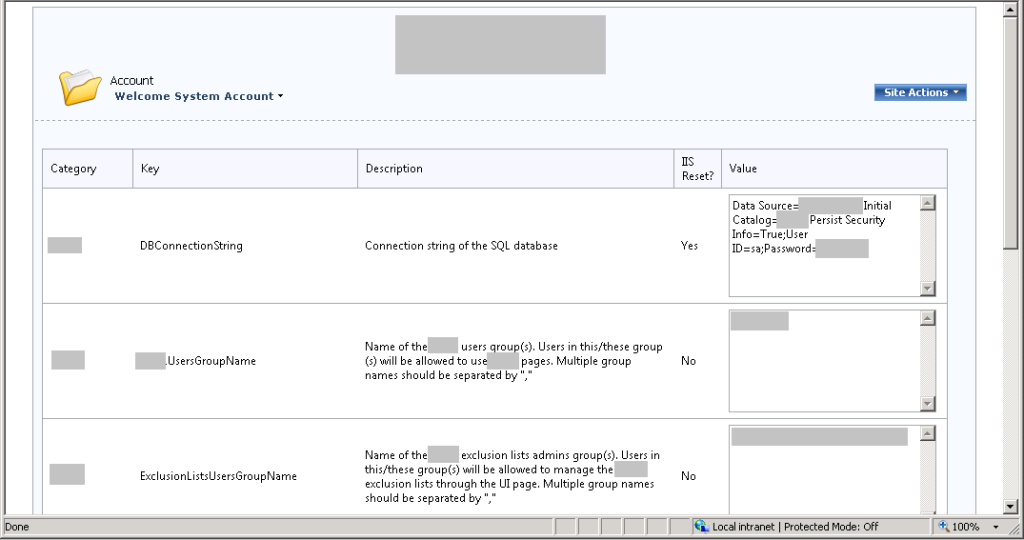
Also, as a proof of concept, I implemented a settings management page which can be used to change the settings values beside providing some valuable info and validations for user inputs.
Using the code below, you can get a page like the one in this screenshot with just few lines of code. This is beside that whenever you add a new setting to your settings catalog, the page is updated automatically and you don't need to apply any changes.
ManageSettings.aspx
ManageSettings.aspx.designer.cs
ManageSettings.aspx.cs
As you can see, it is too easy to believe. Finally, here are some code of helping classes I used.
InternalConstants.cs
Utilities.cs
SystemErrorHandler.cs
You can download the code from here
Sometimes developers deal with settings as if they are some secondary things that should not take much attention. For sure they develop some sort of a methodology to manage it but they don't give it much thinking.
I believe that settings should be treated in a much better way as they represent a very important prospective regarding the business needs and some technical needs. So, why waste this.
Also, sometimes you find that the code is written in a way that makes the business related code is so coupled with the settings back-end storage code. For example; if settings are stored into web.config, you find too many lines of code through the application is accessing the web.config to retrieve the setting value to use it and act accordingly. May be this is acceptable at some point but what if you faced a business need which says that you have to store the settings in a SQL database or a separate XML file or a SharePoint list instead of the web.config???? You think this is too much far to happen .... believe me in the business field it happens.
So, you need to decouple your business code from the code responsible for storing and retrieving your settings values. This is not everything, you also need to centralize your settings and start dealing with them as a main asset which you should make use of.
Imagine that your application user asked you to provide him a decent page with decent UI where he can manage his application settings. This UI should provide some input validations and some good stuff. So, will you go look all around your code to find the settings and then start working on the UI and apply the validations for each field,............. This is good but not that good because every time you find a need for an additional setting you will go back to this page to add your new fields and validations. You will finally notice that most of your code and logic is repeated and this is not good.
So, this is what this post about. After working on a design to help me what I wanted to achieve here, I came out with some code which I really find decent enough to overcome many of the issues I faced before. This code is currently used on a commercial web application for a big company and it approved me right. I am proud of it.
So now it is the time to see some code.
Decoupling business code from settings back-end provider code
SettingsDefinitions.cs
This file includes the definitions (classes, enums, interfaces) which we need to decouple our business code from the code related to the back-end we use to store our settings. Our business code will use these definitions to interact with the settings back-end in an indirect way so that our business code doesn't care if this back-end is a web.config, other XML file, SQL database, Oracle database, NTFS file,..... or any other type of back-end. This is a good thing as anytime we need to modify or change this back-end we will not suffer from changing too many code through the whole application, this is beside the cost of testing all the touched and changed code.
using System;
using System.Collections.Generic;
using System.Linq;
using System.Text;

namespace DevelopmentSimplyPut.CommonUtilities.Settings
{
    [Serializable]
    public class SettingCatalogToken
    {
        public BusinessSetting BusinessSettingName { set; get; }
        public string Category { set; get; }
        public string Key { set; get; }
        public string Description { set; get; }
        public bool Mandatory { set; get; }
        public string DefaultValue { set; get; }
        public string Hint { set; get; }
        public bool RequiresIISReset { set; get; }
        public Func<string, bool> Validator { set; get; }
        public Func<string, object> Converter { set; get; }
    }

    [Serializable]
    public class SettingToken
    {
        public SettingCatalogToken SettingDefinition { set; get; }
        public string Value { set; get; }
        public bool ShowHint { set; get; }
        public SettingToken() { }

        public SettingToken(SettingCatalogToken settingDefinition, string value)
        {
            SettingDefinition = settingDefinition;
            Value = value;
        }
    }

 public enum SettingsProviderType
    {
        ConfigStore = 0,
        WebConfig = 1
    }

    public interface ISettingsProvider
    {
        string GetSettingValue(string category, string key);
        void AddSettings(List<SettingToken> entries);
    }

    public class SettingsProviderFactory
    {
        public static ISettingsProvider GetProvider(SettingsProviderType providerType)
        {
            ISettingsProvider provider;

            switch (providerType)
            {
                case SettingsProviderType.ConfigStore:
                    provider = new ConfigStoreSettingsProvider();
                    break;
                case SettingsProviderType.WebConfig:
                    provider = new WebConfigSettingsProvider();
                    break;
                default:
                    provider = GetProvider(InternalConstants.DefaultSystemSettingsProvider);
                    break;
            }

            return provider;
        }
    }
}
As you can see in the code above, our business code will deal with the interface "ISettingsProvider". Any class implementing this interface is assured to have the two methods "string GetSettingValue(string category, string key)" and "void AddSettings(List<SettingToken> entries)". So, whenever our business code needs to interact with our settings back-end -lets now call it provider- it can use this interface signature and defer/delegate the implementation to the run-time. By the way, the code above makes use of the "Strategy" and "Factory" design patterns.
Now, let's suggest some back-end storage providers for our settings so that we can plug into our application to test our code and the decoupling concept it represents.
For the sake of demonstration, I will assume two providers, one as a web.config and the other is a third party module known as "Config Store" which is used with SharePoint to store and retrieve settings from a SharePoint list.
WebConfigSettingsProvider.cs
This file provides the definition of a class representing a settings provider which depends on a web.config file as its back-end. For sure this class should implement the "ISettingsProvider" interface.
using System;
using System.Collections.Generic;
using System.Linq;
using System.Text;
using System.Configuration;
using Microsoft.SharePoint.Administration;
using System.Globalization;
using DevelopmentSimplyPut.CommonUtilities.Logging;
using System.Web.Configuration;
using Microsoft.SharePoint;

namespace DevelopmentSimplyPut.CommonUtilities.Settings
{
    public class WebConfigSettingsProvider : ISettingsProvider
    {
        public string GetSettingValue(string category, string key)
        {
            SystemLogger.Logger.LogMethodStart
                (
                    "public string GetSettingValue(string category, string key)",
                    new string[] { "category", "key" },
                    new object[] { category, key }
                );

            string result = string.Empty;

            SPSecurity.RunWithElevatedPrivileges(delegate()
            {
                using (SPSite site = new SPSite(SPContext.Current.Site.Url))
                {
                    try
                    {
                        Configuration config = WebConfigurationManager.OpenWebConfiguration("/", site.WebApplication.Name);
                        if (config.AppSettings.Settings[category.ToLower() + key.ToLower()] != null)
                        {
                            result = config.AppSettings.Settings[category.ToLower() + key.ToLower()].Value;
                            SystemLogger.Logger.LogMethodEnd("public string GetSettingValue(string category, string key)", true);
                        }
                    }
                    catch(Exception ex)
                    {
                        string msg = "Error in retrieveing a setting value from web.config file.";
                        SystemLogger.Logger.LogMethodEnd("public string GetSettingValue(string category, string key)", false);
                        SystemLogger.Logger.LogError(ex, msg);
                        throw;
                    }
                }
            });

            return result;
        }
        public void AddSettings(List<SettingToken> entries)
        {
            SystemLogger.Logger.LogMethodStart
                (
                    "public void AddSettings(SettingToken[] entries)",
                    new string[] { "entries" },
                    new object[] { entries }
                );

            SPSecurity.RunWithElevatedPrivileges(delegate()
            {
                using (SPSite site = new SPSite(SPContext.Current.Site.Url))
                {
                    try
                    {
                        SPWebService service = SPWebService.ContentService;

                        foreach (SettingToken token in entries)
                        {
                            SPWebConfigModification myModification = new SPWebConfigModification();
                            myModification.Path = "configuration/appSettings";
                            myModification.Name = string.Format(CultureInfo.InvariantCulture, "add[@key=\"{0}\"]", token.SettingDefinition.Category.ToLower() + token.SettingDefinition.Key.ToLower());
                            myModification.Sequence = 0;
                            myModification.Owner = "System";
                            myModification.Type = SPWebConfigModification.SPWebConfigModificationType.EnsureChildNode;
                            myModification.Value = string.Format(CultureInfo.InvariantCulture, "<add key=\"{0}\" value=\"{1}\"/>", token.SettingDefinition.Category.ToLower() + token.SettingDefinition.Key.ToLower(), token.Value);
                            site.WebApplication.WebConfigModifications.Add(myModification);
                            service.Update();
                            service.ApplyWebConfigModifications();
                        }

                        SystemLogger.Logger.LogMethodEnd("public void AddSettings(SettingToken[] entries)", true);
                    }
                    catch (Exception ex)
                    {
                        string msg = "Error in adding setting entries in web.config file.";
                        SystemLogger.Logger.LogError(ex, msg);
                        SystemLogger.Logger.LogMethodEnd("public void AddSettings(SettingToken[] entries)", false);
                        throw;
                    }
                }
            });
        }
    }
}
As you can see in the code above, the code is dependant on the context it runs inside. For example, the code above runs in a SharePoint environment and that's why it uses some SharePoint APIs to carry out some tasks and logic. But, still our business code doesn't care and this is the beauty of it.
ConfigStoreSettingsProvider.cs
This file provides the definition of a class representing a settings provider which depends on the third party "Config Store" as its back-end. You are not asked to understand every line of code but you should grasp the whole concept behind it.
using System;
using System.Collections.Generic;
using System.Linq;
using System.Text;
using System.Globalization;
using COB.SharePoint.Utilities;
using Microsoft.SharePoint;
using DevelopmentSimplyPut.CommonUtilities.Logging;

namespace DevelopmentSimplyPut.CommonUtilities.Settings
{
    public class ConfigStoreSettingsProvider : ISettingsProvider
    {
        public string GetSettingValue(string category, string key)
        {
            SystemLogger.Logger.LogMethodStart
                (
                    "public string GetSettingValue(string category, string key)",
                    new string[] { "category", "key" },
                    new object[] { category, key }
                );

            string result = string.Empty;

            try
            {
                result = ConfigStore.GetValue(category, key);
                SystemLogger.Logger.LogMethodEnd("public string GetSettingValue(string category, string key)", true);
            }
            catch (Exception ex)
            {
                SystemLogger.Logger.LogError(ex, "Error in retrieving a setting value from config store list.");
                SystemLogger.Logger.LogMethodEnd("public string GetSettingValue(string category, string key)", false);
                throw;
            }

            return result;
        }
        public void AddSettings(List<SettingToken> entries)
        {
            SystemLogger.Logger.LogMethodStart
                (
                    "public void AddSettings(SettingToken[] entries)",
                    new string[] { "entries" },
                    new object[] { entries }
                );

            SPSecurity.RunWithElevatedPrivileges(delegate()
            {
                using (SPSite site = new SPSite(SPContext.Current.Site.Url))
                {
                    using (SPWeb web = site.RootWeb)
                    {
                        try
                        {
                            web.AllowUnsafeUpdates = true;
                            SPList configStoreList = web.Lists[InternalConstants.ConfigStoreListName];

                            foreach (SettingToken token in entries)
                            {
                                SPQuery query = new SPQuery();
                                query.Query = string.Format
                                    (
                                        CultureInfo.InvariantCulture,
                                        @"<Where>
                                            <And>
                                                <Eq>
                                                    <FieldRef Name='{0}'/>
                                                    <Value Type='{1}'>{2}</Value>
                                                </Eq>
                                                <Eq>
                                                    <FieldRef Name='{3}'/>
                                                    <Value Type='{4}'>{5}</Value>
                                                </Eq>
                                            </And>
                                        </Where>",
                                        ConfigStore.CategoryField,
                                        "Text",
                                        token.SettingDefinition.Category,
                                        ConfigStore.KeyField,
                                        "Text",
                                        token.SettingDefinition.Key);

                                query.ViewFields = "<FieldRef Name='Title'/>";
                                query.RowLimit = 1;

                                SPListItemCollection items = configStoreList.GetItems(query);

                                if (null != items && items.Count > 0)
                                {
                                    string msg = "Setting with category = \"{0}\" and key = \"{1}\" already exists";
                                    SystemLogger.Logger.LogInfo
                                        (
                                            string.Format
                                                (
                                                    CultureInfo.InvariantCulture,
                                                    msg,
                                                    token.SettingDefinition.Category,
                                                    token.SettingDefinition.Key
                                                )
                                        );

                                    foreach (SPListItem item in items)
                                    {
                                        item[ConfigStore.ValueField] = token.Value;
                                        item["ConfigItemDescription"] = token.SettingDefinition.Description;
                                        item.Update();
                                    }
                                    configStoreList.Update();
                                    SystemLogger.Logger.LogInfo("Setting value is updated to \"" + token.Value + "\"");
                                }
                                else
                                {
                                    SPListItem entry = configStoreList.Items.Add();
                                    entry[ConfigStore.CategoryField] = token.SettingDefinition.Category;
                                    entry[ConfigStore.KeyField] = token.SettingDefinition.Key;
                                    entry[ConfigStore.ValueField] = token.Value;
                                    entry["ConfigItemDescription"] = token.SettingDefinition.Description;
                                    entry.SystemUpdate();
                                    configStoreList.Update();
                                }
                            }

                            SystemLogger.Logger.LogMethodEnd("public void AddSettings(SettingToken[] entries)", true);
                        }
                        catch (Exception ex)
                        {
                            SystemLogger.Logger.LogError(ex, "Error in adding setting entries in config store list.");
                            web.AllowUnsafeUpdates = false;
                            SystemLogger.Logger.LogMethodEnd("public void AddSettings(SettingToken[] entries)", false);
                            throw;
                        }
                    }
                }
            });
        }
    }
}
Now, after we have defined our possible settings providers, we can use our factory "SettingsProviderFactory" throughout our business code to get a run-time instance of a provider and start using it by calling the two methods we know. This is good but there is better.
We can write a class which is responsible for choosing the proper provider and handling some logic to finally provide the rest of our code with a settings provider.
SystemSettingsProvider.cs
This file includes a class which handles some logic to choose the proper settings provider and then pass it to our business code. You will find some methods using some classes which are not explained or mentioned yet so don't worry, this will be covered later in this post.
using System;
using System.Collections.Generic;
using System.Linq;
using System.Text;
using System.Collections.ObjectModel;
using DevelopmentSimplyPut.CommonUtilities.Logging;
using DevelopmentSimplyPut.CommonUtilities.Helpers;

namespace DevelopmentSimplyPut.CommonUtilities.Settings
{
    public static class SystemSettingsProvider
    {
        private static ISettingsProvider provider;
        public static T GetSettingValue<T>(BusinessSetting businessSettingName)
        {
            return GetSettingValue<T>(GetSettingCatalogToken(businessSettingName));
        }
        public static T GetSettingValue<T>(SettingCatalogToken settingCatalogToken)
        {
            string value = null;
            T result = default(T);

            if (null != settingCatalogToken)
            {
                try
                {
                    value = Provider.GetSettingValue(settingCatalogToken.Category, settingCatalogToken.Key);
                }
                catch (Exception ex)
                {
                    if (settingCatalogToken.Mandatory)
                    {
                        SystemErrorHandler.HandleError(ex, "\"" + settingCatalogToken.Key + "\" setting is not set");
                    }
                    else
                    {
                        value = settingCatalogToken.DefaultValue;
                    }
                }

                if (!settingCatalogToken.Validator(value))
                {
                    if (settingCatalogToken.Mandatory)
                    {
                        SystemErrorHandler.HandleError("Provided \"" + settingCatalogToken.Key + "\" setting is not valid");
                    }
                    else
                    {
                        value = settingCatalogToken.DefaultValue;
                    }
                }

                result = ((T)settingCatalogToken.Converter(value));
            }
            else
            {
                SystemErrorHandler.HandleError(new Exception("SettingToken is not provided into SettingsCatalog"));
            }

            return result;
        }
        public static string TryGetSettingValue(string category, string key)
        {
            string result = string.Empty;

            try
            {
                result = Provider.GetSettingValue(category, key);
            }
            catch (Exception ex)
            {

            }

            return result;
        }
        public static bool UpdateSettings(List<SettingToken> settings)
        {
            bool result = true;
            List<SettingToken> toBeUpdated = new List<SettingToken>();

            if (null != settings && settings.Count > 0)
            {
                foreach (SettingToken token in settings)
                {
                    string value = token.Value;
                    if (!token.SettingDefinition.Validator(value))
                    {
                        token.ShowHint = true;
                        result = false;
                    }
                    else
                    {
                        token.ShowHint = false;
                        toBeUpdated.Add(token);
                    }
                }
            }

            Provider.AddSettings(toBeUpdated);

            return result;
        }
        public static SettingCatalogToken GetSettingCatalogToken(BusinessSetting businessSettingName)
        {
            return SystemSettingsCatalog.SettingsCatalog.DefaultIfEmpty(null).FirstOrDefault(setting => setting.BusinessSettingName == businessSettingName);
        }
        private static void SetProvider(SettingsProviderType providerType)
        {
            SystemLogger.Logger.LogMethodStart
                (
                    "private static void SetProvider(SettingsProviderType providerType)",
                    new string[] { "providerType" },
                    new object[] { providerType }
                );

            try
            {
                provider = SettingsProviderFactory.GetProvider(providerType);
                SystemLogger.Logger.LogInfo("SystemSetitngsProvider is set to " + providerType.ToString());
                SystemLogger.Logger.LogMethodEnd("private static void SetProvider(SettingsProviderType providerType)", true);
            }
            catch (Exception ex)
            {
                SystemLogger.Logger.LogError(ex, "Failed in setting SettingsProviderType");
                SystemLogger.Logger.LogMethodEnd("private static void SetProvider(SettingsProviderType providerType)", false);
                throw;
            }
        }
        private static ISettingsProvider Provider
        {
            get
            {
                if (provider == null)
                {
                    SetProvider(InternalConstants.DefaultSystemSettingsProvider);
                }
                return provider;
            }
        }
        public static void ResetProvider()
        {
            ResetProvider(InternalConstants.DefaultSystemSettingsProvider);
        }
        public static void ResetProvider(SettingsProviderType providerType)
        {
            SetProvider(providerType);
        }
    }
}
As you can see in the code above, this class decides which provider to use and encapsulates some useful logic to be used throughout the rest of the code. So, whenever you need to interact with a settings provider you use this static class methods to achieve what you want.
As I said before, you may have noticed some strange code in the class above that uses some classes that are not defined or explained yet. This code depends on some code I will provide in the second section of this post. This section is talking out how to deal with your settings as an asset.
Settings as an asset
Every setting in your application has some properties which can describe it. Also it has some actions related to it. Doesn't this ring a bell? Isn't this make you shout out loud the word "Class".
This is true, your settings are not just pairs of keys and values. They are a fully qualified class which has its behavior.
For example, if you have in your application a setting which holds a connection string for a SQL database you use throughout the application, don't you want to check if the value provided by the application user is a valid connection string format as you know that it needs to match a certain regular expression? don't you also need to make sure that the value provided represents an online and running SQL database?
If your answer is "Yes", so why do you depend on a helper method in a utility class to do all your checks and you have to call it explicitly whenever you want to verify a connection string? Why don't you keep this verification logic as close as you can to your setting?
Also, If you mark every setting with a key so that you can retrieve this setting from its back-end anytime, why to use a string -array of characters- which you can misspell? why don't you use a more concrete and stable way like enums? This is what I am trying to achieve in the code below.
SystemSettingsCatalog.cs
This file includes an internal catalog which includes all your application settings as fully qualified instances of a fully qualified class encapsulating their verification and conversion logic.
using System;
using System.Collections.Generic;
using System.Linq;
using System.Text;
using System.Collections.ObjectModel;
using DevelopmentSimplyPut.CommonUtilities.Helpers;

namespace DevelopmentSimplyPut.CommonUtilities.Settings
{
 public enum BusinessSetting
    {
        DBConnectionString = 0,
        AdminsGroupName = 1,
  GridPageSize = 2,
        AutoCompleteMinCharCount = 3
    }

    public static class SystemSettingsCatalog
    {
        #region Constructor
        static SystemSettingsCatalog()
        {
            settingsCatalog = new Collection<SettingCatalogToken>();

   settingsCatalog.Add(new SettingCatalogToken()
            {
                BusinessSettingName = BusinessSetting.DBConnectionString,
                Category = "DevelopmentSimplyPut",
                Key = "DBConnectionString",
                Description = "Connection string of the SQL database",
                DefaultValue = string.Empty,
                Mandatory = true,
                RequiresIISReset = true,
                Hint = "Should be a valid ConnectionString of an online SQL database",
                Validator = new Func<string, bool>
                    (
                        delegate(string settingValue)
                        {
                            string exceptionMessage;
                            return Utilities.VerifySQLConnectionString(settingValue, out exceptionMessage);
                        }
                    ),
                Converter = new Func<string, object>
                    (
                        delegate(string settingValue)
                        {
                            return settingValue;
                        }
                    )
            });
            settingsCatalog.Add(new SettingCatalogToken()
            {
                BusinessSettingName = BusinessSetting.AdminsGroupName,
                Category = "DevelopmentSimplyPut",
                Key = "AdminsGroupName",
                Description = "Name of the Admins users group(s). Users in this/these group(s) will be allowed to access administration pages. Multiple group names should be separated by \",\"",
                DefaultValue = "AdminGroup",
                Mandatory = false,
                RequiresIISReset = false,
                Hint = string.Empty,
                Validator = new Func<string, bool>
                    (
                        delegate(string settingValue)
                        {
                            return true;
                        }
                    ),
                Converter = new Func<string, object>
                    (
                        delegate(string settingValue)
                        {
                            return settingValue;
                        }
                    )
            });
            settingsCatalog.Add(new SettingCatalogToken()
            {
                BusinessSettingName = BusinessSetting.GridPageSize,
                Category = "DevelopmentSimplyPut",
                Key = "GridPageSize",
                Description = "Number of items to be viewed in each page of the system data grids",
                DefaultValue = "20",
                RequiresIISReset = false,
                Mandatory = false,
                Hint = "Should be an integer greater than 0",
                Validator = new Func<string, bool>
                    (
                        delegate(string settingValue)
                        {
                            int result = 0;
                            return (int.TryParse(settingValue, out result) && result > 0);
                        }
                    ),
                Converter = new Func<string, object>
                    (
                        delegate(string settingValue)
                        {
                            return int.Parse(settingValue);
                        }
                    )
            });
            settingsCatalog.Add(new SettingCatalogToken()
            {
                BusinessSettingName = BusinessSetting.AutoCompleteMinCharCount,
                Category = "DevelopmentSimplyPut",
                Key = "AutoCompleteMinCharCount",
                Description = "The minimum number of characters to be entered into the textbox input fields for the auto-complete functionality to start. Please note that the chosen value will affect the system performance, so try to choose a number as large as you can",
                DefaultValue = "10",
                Mandatory = false,
                RequiresIISReset = false,
                Hint = "Should be an integer greater than 0",
                Validator = new Func<string, bool>
                    (
                        delegate(string settingValue)
                        {
                            int result = 0;
                            return (int.TryParse(settingValue, out result) && result > 0);
                        }
                    ),
                Converter = new Func<string, object>
                    (
                        delegate(string settingValue)
                        {
                            return int.Parse(settingValue);
                        }
                    )
            });
        }
        #endregion

        #region SettingsCatalog
        private static Collection<SettingCatalogToken> settingsCatalog;
        public static Collection<SettingCatalogToken> SettingsCatalog
        {
            get
            {
                return settingsCatalog;
            }
        }
        #endregion
    }
}
As you can see in the code above, all info and actions related to an application setting are encapsulated into one class which can be easily managed and extended anytime.
Also, we have a catalog of all our application settings which we can use every time we need to refer to a certain setting or even list all our settings -as we will see later in this post- beside being able to use enums instead of just strings as identifiers for our settings.
The proof
Now, whenever you need to retrieve a value for a certain setting, you can call it as follows
string dbConnectionStr = SystemSettingsProvider.GetSettingValue<string>(BusinessSetting.DBConnectionString);
string adminGroupName = SystemSettingsProvider.GetSettingValue<string>(BusinessSetting.AdminsGroupName);
int gridPageSize = SystemSettingsProvider.GetSettingValue<int>(BusinessSetting.GridPageSize);
int autoCompleteMinCharCount = SystemSettingsProvider.GetSettingValue<int>(BusinessSetting.AutoCompleteMinCharCount);
Also, as a proof of concept, I implemented a settings management page which can be used to change the settings values beside providing some valuable info and validations for user inputs.
Using the code below, you can get a page like the one in this screenshot with just few lines of code. This is beside that whenever you add a new setting to your settings catalog, the page is updated automatically and you don't need to apply any changes.
ManageSettings.aspx
<%@ Page Language="C#" AutoEventWireup="true" enableSessionState="True" Inherits="DevelopmentSimplyPut.Pages.ManageSettings, DevelopmentSimplyPut,  Version=1.0.0.0, Culture=neutral, PublicKeyToken=5b3b2dbf31f780b4" %>

<%@ Import Namespace="DevelopmentSimplyPut.CommonUtilities" %>
<%@ Import Namespace="Microsoft.SharePoint" %>
<%@ Import Namespace="Microsoft.SharePoint.ApplicationPages" %>
<%@ Register TagPrefix="SharePoint" Namespace="Microsoft.SharePoint.WebControls"
    Assembly="Microsoft.SharePoint, Version=12.0.0.0, Culture=neutral, PublicKeyToken=71e9bce111e9429c" %>
<%@ Register TagPrefix="asp" Namespace="System.Web.UI.WebControls" Assembly="System.Web.Extensions, Version=3.5.0.0, Culture=neutral, PublicKeyToken=31BF3856AD364E35" %>
<%@ Register TagPrefix="SPSWC" Namespace="Microsoft.SharePoint.Portal.WebControls"
    Assembly="Microsoft.SharePoint.Portal, Version=12.0.0.0, Culture=neutral, PublicKeyToken=71e9bce111e9429c" %>
<%@ Register TagPrefix="wssawc" Namespace="Microsoft.SharePoint.WebControls" Assembly="Microsoft.SharePoint, Version=12.0.0.0, Culture=neutral, PublicKeyToken=71e9bce111e9429c" %>
<%@ Register TagPrefix="WebPartPages" Namespace="Microsoft.SharePoint.WebPartPages"
    Assembly="Microsoft.SharePoint, Version=12.0.0.0, Culture=neutral, PublicKeyToken=71e9bce111e9429c" %>
<%@ Register TagPrefix="PublishingWebControls" Namespace="Microsoft.SharePoint.Publishing.WebControls"
    Assembly="Microsoft.SharePoint.Publishing, Version=12.0.0.0, Culture=neutral, PublicKeyToken=71e9bce111e9429c" %>
<%@ Register TagPrefix="Nav" Namespace="Microsoft.SharePoint.Publishing.Navigation"
    Assembly="Microsoft.SharePoint.Publishing, Version=12.0.0.0, Culture=neutral, PublicKeyToken=71e9bce111e9429c" %>
<%@ Register TagPrefix="wssuc" TagName="InputFormSection" Src="~/_controltemplates/InputFormSection.ascx" %>
<%@ Register TagPrefix="wssuc" TagName="InputFormControl" Src="~/_controltemplates/InputFormControl.ascx" %>
<%@ Register TagPrefix="wssuc" TagName="ButtonSection" Src="~/_controltemplates/ButtonSection.ascx" %>
<%@ Register TagPrefix="wssuc" TagName="Welcome" Src="~/_controltemplates/Welcome.ascx" %>
<%@ Register TagPrefix="wssuc" TagName="DesignModeConsole" Src="~/_controltemplates/DesignModeConsole.ascx" %>
<%@ Register TagPrefix="PublishingVariations" TagName="VariationsLabelMenu" Src="~/_controltemplates/VariationsLabelMenu.ascx" %>
<%@ Register TagPrefix="PublishingConsole" TagName="Console" Src="~/_controltemplates/PublishingConsole.ascx" %>
<%@ Register TagPrefix="PublishingSiteAction" TagName="SiteActionMenu" Src="~/_controltemplates/PublishingActionMenu.ascx" %>
<asp:content id="PageTitle" runat="server" contentplaceholderid="PlaceHolderPageTitle">
    Manage Settings
</asp:content>
<asp:content id="PageTitleInTitleArea" runat="server" contentplaceholderid="PlaceHolderPageTitleInTitleArea">
</asp:content>
<asp:content id="Main" runat="server" contentplaceholderid="PlaceHolderMain">
    <script>
    </script>

 <table cellspacing="0" cellpadding="3" width="100%">
     <tr>
         <td>
             <div id="SettingsGridDiv" runat="server" class="grid">
                 <DevelopmentSimplyPutWebControls:EnhancedDataGrid runat="server"
                 ID="grd_Settings"
                 AutoGenerateColumns="False"
                 AllowPaging="false"
                 AllowSorting="false"
                 PageSize="200"
                 CurrentPageIndex="0"
                 VirtualItemCount="0"
                 ExportToExcel="False"
                 BorderStyle="None"
                 Width="100%"
                 GridLines="None"
                 HorizontalAlign="Center"
                 HorizontalScrollBarVisibility="Hidden"
                 SortingUpImageRelativePath="tri-up.gif"
                 SortingDownImageRelativePath="tri.gif"
                 PagingNextImageRelativePath="rmc/pager_next_arrow.png"
                 PagingPrevImageRelativePath="rmc/pager_perv_arrow.png"
                 CssClass="gridStyle-table">
                 <RowStyle CssClass="gridStyle-tr-data" Wrap="False" />
                 <AlternatingRowStyle CssClass="gridStyle-tr-alt-data" Wrap="False" />
                 <HeaderStyle CssClass="gridStyle-tr-header" />
                  <Columns>
                   <asp:TemplateField HeaderText="Category">
                    <ItemTemplate>
                     <asp:Label  ID="lbl_Category" Text='<%# Eval("SettingDefinition.Category") %>'
                      runat="server" />
                    </ItemTemplate>
                    <ItemStyle CssClass="gridStyle-item-td Category-Css" />
                    <HeaderStyle CssClass="gridStyle-header-th Category-Css" Wrap="true" Width="10%"/>
                   </asp:TemplateField>
                   <asp:TemplateField HeaderText="Key">
                    <ItemTemplate>
                     <asp:Label  ID="lbl_Key" Text='<%# Eval("SettingDefinition.Key") %>'
                      runat="server" />
                    </ItemTemplate>
                    <ItemStyle CssClass="gridStyle-item-td Key-Css" />
                    <HeaderStyle CssClass="gridStyle-header-th Key-Css" Wrap="true" Width="25%"/>
                   </asp:TemplateField>
                   <asp:TemplateField HeaderText="Description">
                    <ItemTemplate>
                     <asp:Label  ID="lbl_Description" Text='<%# Eval("SettingDefinition.Description") %>'
                      runat="server" />
                    </ItemTemplate>
                    <ItemStyle CssClass="gridStyle-item-td Description-Css" />
                    <HeaderStyle CssClass="gridStyle-header-th Description-Css" Wrap="true" Width="35%"/>
                   </asp:TemplateField>
                   <asp:TemplateField HeaderText="IIS Reset?">
                    <ItemTemplate>
                     <asp:Label  ID="lbl_IISReset" Text='<%# ((bool)Eval("SettingDefinition.RequiresIISReset"))? "Yes" : "No" %>'
                      runat="server" />
                    </ItemTemplate>
                    <ItemStyle CssClass="gridStyle-item-td IISReset-Css" />
                    <HeaderStyle CssClass="gridStyle-header-th IISReset-Css" Wrap="true" Width="5%"/>
                   </asp:TemplateField>
                   <asp:TemplateField HeaderText="Value">
                    <ItemTemplate>
                     <asp:TextBox id="txt_Value" TextMode="Multiline" runat="server" Width="95%" Text='<%# Eval("Value") %>'/>
                                    <asp:RequiredFieldValidator ID="vld_txt_Value_NotEmpty" Text="Field is required"  ControlToValidate="txt_Value"
                                    runat="server" Display="Dynamic"/>
                                    <asp:CustomValidator ID="vld_txt_Value" runat="server"
                                    CssClass="ErrorMessage" ControlToValidate="txt_Value" Display="Dynamic"/>
                    </ItemTemplate>
                    <ItemStyle CssClass="gridStyle-item-td Value-Css" />
                    <HeaderStyle CssClass="gridStyle-header-th Value-Css" Wrap="true" Width="25%"/>
                   </asp:TemplateField>
                  </Columns>
                  </DevelopmentSimplyPutWebControls:EnhancedDataGrid>
             </div>
         </td>
     </tr>
     <tr>
         <td style="text-align:right">
             <asp:HiddenField ID="hdn_SubmitClicked" Value="0" runat="server" />
             <asp:Button class="form-button" Text="Submit Changes" ID="btn_Submit" OnClick="btn_Submit_Click" runat="server" />
         </td>
     </tr>
 </table>
</asp:content>
ManageSettings.aspx.designer.cs
using System.Web.UI.WebControls;
using AjaxControlToolkit;
using DevelopmentSimplyPut.CommonUtilities.WebControls;
using System.Web.UI.HtmlControls;

namespace DevelopmentSimplyPut.Pages
{
    public partial class ManageSettings
    {
        protected EnhancedDataGrid grd_Settings;
        protected Button btn_Submit;
        protected HiddenField hdn_SubmitClicked;
        protected global::System.Web.UI.HtmlControls.HtmlGenericControl SettingsGridDiv;
    }
}
ManageSettings.aspx.cs
using System;
using System.Collections.Generic;
using System.Linq;
using System.Web;
using System.Web.UI;
using System.Web.UI.WebControls;
using Microsoft.SharePoint.WebControls;
using System.Web.Configuration;
using Microsoft.SharePoint;
using System.Configuration;
using DevelopmentSimplyPut.CommonUtilities;
using DevelopmentSimplyPut.CommonUtilities.Logging;
using DevelopmentSimplyPut.CommonUtilities.Settings;
using DevelopmentSimplyPut.CommonUtilities.Security;
using DevelopmentSimplyPut.CommonUtilities.Helpers;
using System.Drawing;
using System.Data;
using DevelopmentSimplyPut.Entities;
using DevelopmentSimplyPut.BusinessLayer;
using DevelopmentSimplyPut.CommonUtilities.WebControls;
using System.Collections.ObjectModel;
using System.Web.UI.HtmlControls;
using System.Globalization;

namespace DevelopmentSimplyPut.Pages
{
    public partial class ManageSettings : BasePage
    {
        #region Events
        protected void Page_Load(object sender, EventArgs e)
        {
            if (!IsPostBack)
            {
                BindData();
            }
        }
        protected void btn_Submit_Click(object sender, EventArgs e)
        {
            if (null != Session["SettingsGridDataSource"])
   {
    List<SettingToken> lst = new List<SettingToken>();
    List<SettingToken> source = (List<SettingToken>)Session["SettingsGridDataSource"];
    foreach (GridViewRow row in grd_Settings.Rows)
    {
     if (row.RowType == DataControlRowType.DataRow)
     {
      SettingToken token = source[row.RowIndex];
      string newValue = ((TextBox)row.FindControl("txt_Value")).Text;
      CustomValidator validatior = (CustomValidator)row.FindControl("vld_txt_Value");

      if (!token.SettingDefinition.Validator(newValue))
      {
       token.ShowHint = true;
       validatior.IsValid = false;
       validatior.ErrorMessage = token.SettingDefinition.Hint;
      }
      else
      {
       token.ShowHint = false;
       validatior.IsValid = true;
       lst.Add(token);
      }

      token.Value = newValue;
     }
    }

    SystemSettingsProvider.UpdateSettings(lst);
   }
        }
        #endregion
        #region Methods
        private void BindData()
        {
            try
            {
                SystemLogger.Logger.LogMethodStart("BindData()", null, null);

                List<SettingToken> settings = GetSettinngs();

                if (null != settings && settings.Count > 0)
                {
                    grd_Settings.Visible = true;
                    SettingsGridDiv.Visible = true;
                    grd_Settings.PageIndex = 0;
                    grd_Settings.VirtualItemCount = settings.Count;
                    Session["SettingsGridDataSource"] = settings;
                    grd_Settings.DataSource = settings;
                    grd_Settings.DataBind();
                }
                else
                {
                    SettingsGridDiv.Visible = false;
                    grd_Settings.Visible = false;
                }

                SystemLogger.Logger.LogMethodEnd("BindData()", true);
            }
            catch (Exception ex)
            {
                SystemLogger.Logger.LogError(ex.Message);
                SystemLogger.Logger.LogMethodEnd("BindData()", false);
                SystemErrorHandler.HandleError(ex);
            }
        }
        private List<SettingToken> GetSettinngs()
        {
            List<SettingToken> result = new List<SettingToken>();

            foreach (SettingCatalogToken token in SystemSettingsCatalog.SettingsCatalog)
            {
                string value = SystemSettingsProvider.TryGetSettingValue(token.Category, token.Key);
                value = (string.IsNullOrEmpty(value)) ? string.Empty : value;

                SettingToken finalToken = new SettingToken();
                finalToken.SettingDefinition = token;
                finalToken.Value = value;

                if (!token.Validator(value))
                {
                    finalToken.ShowHint = true;
                }
                else
                {
                    finalToken.ShowHint = false;
                }

                result.Add(finalToken);
            }

            return result;
        }
        #endregion
    }
}
As you can see, it is too easy to believe. Finally, here are some code of helping classes I used.
InternalConstants.cs
using System;
using System.Collections.Generic;
using System.Linq;
using System.Text;
using DevelopmentSimplyPut.CommonUtilities.Logging;
using DevelopmentSimplyPut.CommonUtilities.Settings;
using DevelopmentSimplyPut.CommonUtilities.Security;
using DevelopmentSimplyPut.CommonUtilities.Helpers;
using Microsoft.SharePoint;
using System.Collections.ObjectModel;

namespace DevelopmentSimplyPut.CommonUtilities
{
    public static class InternalConstants
    {
        #region Settings Provider
        public static SettingsProviderType DefaultSystemSettingsProvider
        {
            get
            {
                return SettingsProviderType.ConfigStore;
            }
        }
        public static string ConfigStoreListName
        {
            get
            {
                return "Config store";
            }
        }
  #endregion
    }
}
Utilities.cs
using System;
using System.Collections.Generic;
using System.Linq;
using System.Text;
using DevelopmentSimplyPut.CommonUtilities.Logging;
using System.Web.UI;
using System.Web.UI.WebControls;
using System.Data.Common;
using System.Data.SqlClient;
using System.Web;

namespace DevelopmentSimplyPut.CommonUtilities.Helpers
{
    public static class Utilities
    {
        /// <summary>
        /// Checks whether a given string represents a valid and online ConnectionString for a SQL database
        /// </summary>
        /// <param name="connectionString">String to be verified</param>
        /// <param name="exceptionMessage">Output exception message if exists</param>
        /// <returns></returns>
        public static bool VerifySQLConnectionString(string connectionString, out string exceptionMessage)
        {
            bool result;

            try
            {
                DbConnectionStringBuilder csb = new DbConnectionStringBuilder();
                csb.ConnectionString = connectionString;

                try
                {
                    using (SqlConnection conn = new SqlConnection(connectionString))
                    {
                        conn.Open();
                    }

                    exceptionMessage = null;
                    result = true;
                }
                catch(Exception ex)
                {
                    exceptionMessage = ex.Message;
                    result = false;
                }
            }
            catch(Exception ex)
            {
                exceptionMessage = ex.Message;
                result = false;
            }

            return result;
        }
    }
}
SystemErrorHandler.cs
using System;
using System.Collections.Generic;
using System.Linq;
using System.Text;
using DevelopmentSimplyPut.CommonUtilities.Logging;
using System.Globalization;
using System.Web.UI;
using System.Web;

namespace DevelopmentSimplyPut.CommonUtilities
{
    public static class SystemErrorHandler
    {
        public static void HandleError(Exception ex, string message)
        {
            string guid = System.Guid.NewGuid().ToString();
            SystemLogger.Logger.LogError(string.Format(CultureInfo.InvariantCulture, "Unexpected error start, GUID = \"{0}\"", guid));

            if (null != ex)
            {
                SystemLogger.Logger.LogError(ex, message);
            }
            else
            {
                SystemLogger.Logger.LogError(message);
            }

            SystemLogger.Logger.LogError(string.Format(CultureInfo.InvariantCulture, "Unexpected error end, GUID = \"{0}\"", guid));
            HttpContext.Current.Response.Redirect
                (
                    string.Format
                    (
                        CultureInfo.InvariantCulture,
                        "{0}/Error.aspx?generalmsg={1}&msg={2}&guid={3}",
                        InternalConstants.PagesDirectoryAbsolutePath,
                        HttpContext.Current.Server.UrlEncode(InternalConstants.UnexpectedErrorMsg),
                        HttpContext.Current.Server.UrlEncode(message),
                        HttpContext.Current.Server.UrlEncode(guid)
                    ), true
                );
        }
        public static void HandleError(Exception ex)
        {
            HandleError(ex, string.Empty);
        }
        public static void HandleError(string message)
        {
            HandleError(new Exception(".."), message);
        }
        public static void HandleError(string exceptionMessage, string message)
        {
            HandleError(new Exception(exceptionMessage), message);
        }
    }
}
You can download the code from here